



When comparing Noamax vs CyberStock, CyberStock provides the stronger tool for contributors who upload to several agencies. Noamax wrote an article ranking Noamax first with 91.88 points and CyberStock last with 65.21 points. The Noamax ranking comes from a vendor test that ignores CyberStock features like direct agency uploading, IPTC embedding, and buyer demand research.
CyberStock vs Noamax at a glance
Feature | CyberStock | Noamax |
|---|---|---|
Keyword order approach | Buyer demand (50M+ searches) | Visible subject first |
Custom controls | Required starting keywords, prompts, context | Fewer advanced controls |
Getty vocabulary | Maps keywords and shows unmatched terms | Yes (Getty matching) |
Agencies formatted per run | 26 agencies | Not stated (microstock CSV exports) |
Upload and submit | CyberPusher auto-submits, 0% commission | Not in Noamax's feature list |
IPTC/XMP embedding | Embeds metadata directly | No direct write-back |
Demand research | Discover shows existing files and demand | Not in Noamax's feature list |
API | Available (60 to 300 requests/minute) | None listed |
Batch size | 1,000 to 1,000,000 files (CyberBatch) | Up to 500 files |
Video credits | 1 credit per file | 3 credits per video |
Cheapest start | 50 credits for $2.99 | 50 credits for $3.99 |
Free start | 20 credits | 20 credits |
If you are reading the Noamax AI review on the Noamax blog, you will see a different picture. Noamax lists several complaints about CyberStock. A closer look at those claims shows where the testing methodology falls short for real stock contributors. CyberStock was built by Alex Bonapart, a working stock contributor who understands the daily requirements of metadata generation and uploading.
Who ran the Noamax test
In October 2026, Noamax published an article ranking the best keyword generators for stock photos. The company that sells Noamax graded the test and gave Noamax first place. Noamax wrote the test, chose the 10 images, built the 100-point rubric, and scored the tools. Nothing about the images, the rubric weights, or the test settings was independent.
Noamax scored the tools as follows: Noamax 91.88, Pixify 86.67, PhotoKeyworder 86.09, Xpiks 82.87, PhotoTag 78.72, ImStocker 78.26, and CyberStock 65.21. When a vendor creates a test to evaluate the vendor's own product against competitors, the vendor usually wins. The Noamax author, Viacheslav Ra, built a grading system that specifically penalized the CyberStock approach to keyword ordering while ignoring the broader CyberStock feature set.
Buyer-first vs subject-first keywords
The Noamax rubric rewards putting the visible subject first by design. Noamax then calls the buyer-first ordering approach of CyberStock a flaw. For a Santorini photo, Noamax complained that CyberStock started with terms like "travel, tourism, vacation, destination, mediterranean, coastal, luxury, holiday, leisure, summer" while placing Greece and Santorini at positions 18 and 19. For a pizza photo, Noamax criticized CyberStock for starting with "gastronomy, catering, hospitality, lifestyle".
CyberStock orders keywords based on more than 50 million real buyer searches. Adobe Stock states in Adobe's contributor guidelines that keyword order should reflect importance and asks contributors to think like a buyer (Adobe Stock keywords). Adobe Stock gives the first 10 keywords the most weight, so CyberStock puts the strongest buyer terms first. Even the author of the Noamax test admits the CyberStock approach may reflect buyer intent. The keyword ordering reflects a different philosophy on metadata.
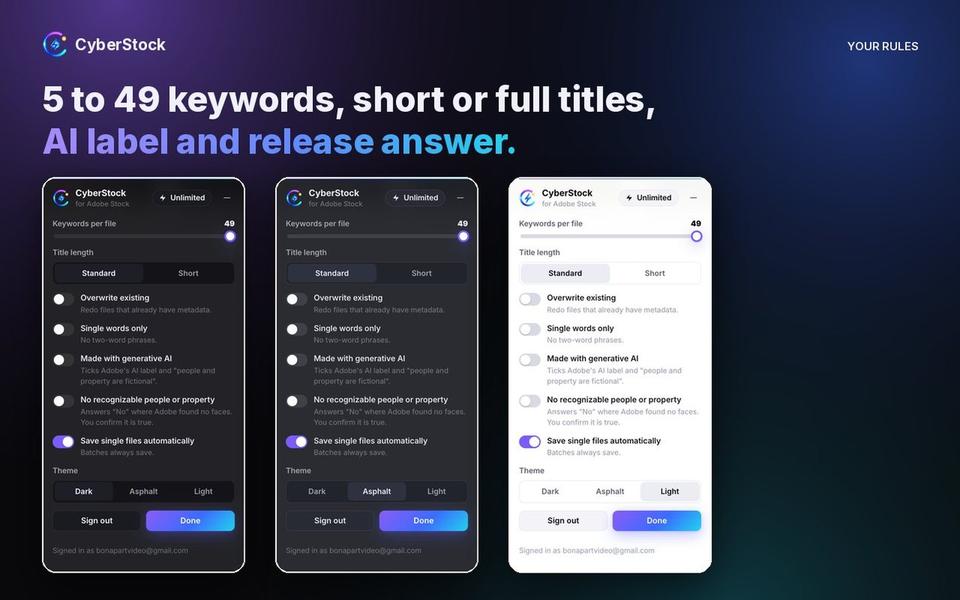
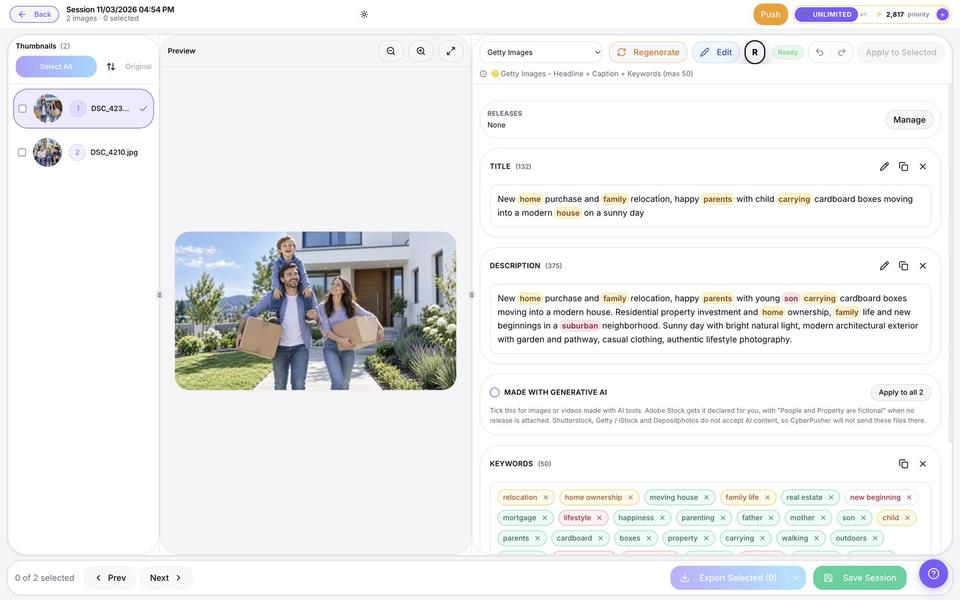
If you want a specific location first, CyberStock gives you the tools to do exactly that. You can put "Santorini" in the Required starting keywords setting, use your file name as context, or write a custom prompt. Noamax tested only the default mode, ignored these CyberStock tools, and then listed a lack of advanced prompt and custom instruction controls as a Noamax weakness. Using the Required starting keywords feature puts Santorini, Greece, and Oia first, followed immediately by the strongest buyer terms. CyberStock also provides settings that help avoid metadata refusals, including Excluded keywords to block brand names, prohibited characters filtering, single-word mode, and limits of 5 to 49 keywords.
What Noamax got factually wrong
The Noamax test includes clear factual errors about CyberStock capabilities and pricing. Noamax claims CyberStock has no dedicated Getty Images controlled vocabulary and disambiguation workflow. CyberStock includes CyberPusher, which specifically maps keywords to the Getty Images controlled vocabulary and shows you exactly which terms did not match.
Noamax also prints wrong prices for CyberStock plans in the Noamax pricing row. The Noamax article claims CyberStock charges $9 a month for 200 credits, $19 a month for 800 credits, $49 a month for 3,000 credits, and $35 for 1,000 top-up credits. The actual CyberStock pricing starts at $9 a month for the Starter plan with 300 credits, $19 a month for the Pro plan with 1,000 credits and the CyberStock API, and $79 a month for the Unlimited plan. Monthly credits reset each billing cycle.
You can also buy one-time packs of 50 credits for $2.99, 100 credits for $4.99, or 1,000 credits for $24.99 with no subscription. Purchased credits never expire and apply to keywording and CyberPusher uploads. Noamax pricing from the Noamax table starts at $9.99 for 500 credits, $17.99 for 1,000 credits, $34.99 for 2,500 credits, and $59.99 for 5,000 credits a month. For pay-as-you-go, Noamax charges $3.99 for 50 credits. The cheapest no-subscription start remains CyberStock at $2.99 for 50 credits versus Noamax at $3.99 for 50 credits.
What the Noamax test left out
The Noamax rubric skips features that working stock contributors rely on daily. Noamax mentions no uploading or submitting features in the Noamax feature list.
Uploading and submitting to agencies
CyberPusher 2.0 auto-uploads and submits your files to Shutterstock, Adobe Stock, Getty Images / iStock, and Depositphotos. CyberPusher Classic sends files to 14 agencies over FTP and SFTP, including Pond5, Dreamstime, 123RF, and Alamy. CyberStock charges 1 credit per file for all agencies in a run and takes 0% commission on your royalties. There are no credits charged for pushes on the Unlimited plan. The Noamax tool only generates titles, descriptions, and keywords.
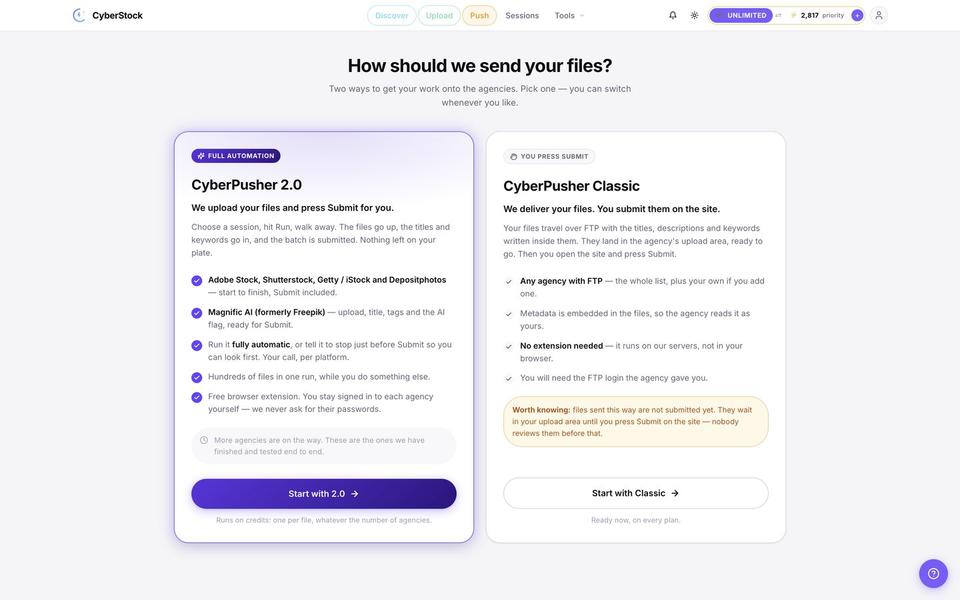
CyberPusher also manages agency CAPTCHAs during the upload process. CyberPusher uses your own CAPTCHA-solver key if you add one to your settings. If you do not have a key, CyberPusher simply pauses and shows you the challenge to solve manually. CyberStock keeps the submission process moving.
Contributors can also use the free CyberStock for Adobe Stock Chrome extension. On the Adobe Stock contributor portal, the extension writes a title and up to 49 keywords into the Adobe fields for every file in your upload queue or one file inside the Adobe panel. The extension saves the metadata and never presses submit, so you keep full control. The extension includes the generative AI checkbox and the recognizable people or property question. CyberStock charges 1 credit per file for the extension workflow.
Embedding IPTC and XMP metadata
CyberStock embeds IPTC and XMP metadata directly into your files. Noamax lists the lack of direct IPTC and XMP metadata write-back as a Noamax con. Embedding metadata saves time because agencies read the titles and keywords automatically when you upload the files. CyberStock also exports CSV files for each agency, formatting titles, descriptions, and keywords for 26 stock sites and tools in 39 output languages without charging extra credits for switching the target site. Noamax lists CSV exports, but CyberStock formats the data specifically for 26 different agency requirements.
Buyer demand research
CyberStock offers Discover to show you buyer demand before you shoot or generate images. Noamax's own feature list includes no demand research. CyberStock Keyword Trends updates every 72 hours with data from Shutterstock Trends, Getty Insights top searches and rising searches, iStock trending, Adobe Stock top keywords, and Google. Discover is included for CyberStock subscribers on monthly plans.

Discover shows exactly how many files already compete for a concept and when seasonal demand arrives. For example, "Veterans Day" shows high demand at 14.5x with about 242,000 competing files on Adobe Stock, while "Christmas" has about 20.2 million competing files, representing more than 80 times the competition. CyberStock Keyword Trends divides the data into tabs for Trending now, Create now, and Forecasts for 4 weeks to 12 months ahead. CyberStock helps you choose what to create.
API access and batch size
CyberStock offers the CyberStock API for contributors who want to keyword files from custom scripts, a DAM, or an upload pipeline. The CyberStock API is included with the Pro plan, Unlimited plan, and the 60,000 and 120,000 credit packs. The CyberStock API handles 60 requests per minute on the Pro plan and 60,000 credit pack, 120 requests per minute on the 120,000 credit pack, and 300 requests per minute on the Unlimited plan. Noamax does not list an API.
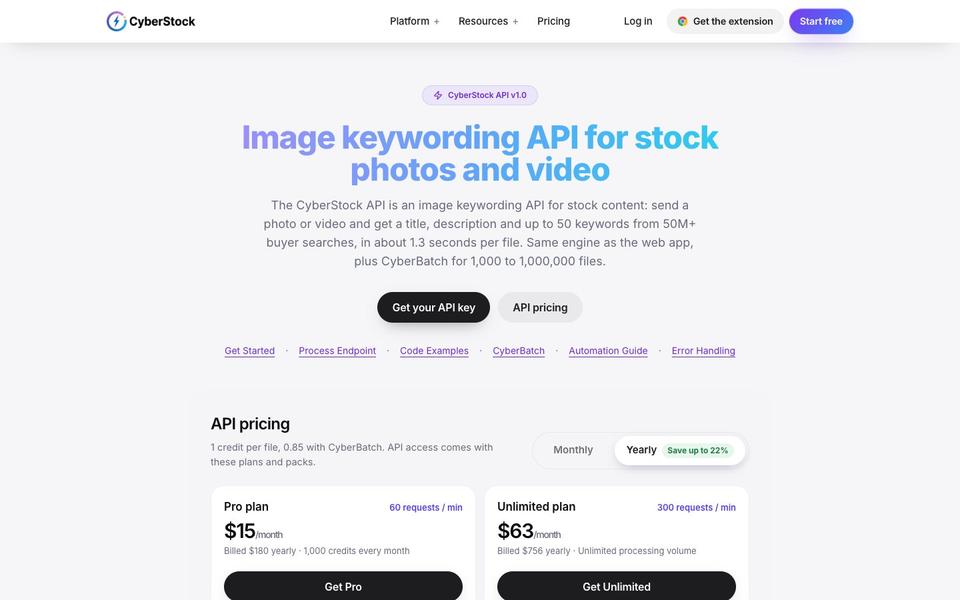
For large catalogs, CyberBatch processes between 1,000 and 1,000,000 files per background job, with priority processing on paid plans and large packs. CyberStock handles catalogs of over 100,000 files, and one CyberStock account holds over 800,000 processed files. Noamax states Noamax batches go up to 500 files, which limits contributors with massive archives.
When Noamax might suit you
Noamax offers a clean interface for a contributor who keywords for only one agency and wants a simple, keyword-only tool. If you do not need to check buyer demand, upload to multiple agencies, or embed metadata directly into your files, Noamax handles basic keywording well. The Noamax tool provides a history you can edit and a 7 to 10 frame video analysis. CyberStock still covers that exact workflow while formatting titles, descriptions, and keywords for 26 stock sites in 39 languages in a single run.
Try both on your own files
The best way to evaluate Noamax keywording against CyberStock is to test both tools on your own images or videos. CyberStock works with photos, videos, and vectors, including JPG, PNG, WEBP, MP4, MOV, and SVG formats. CyberStock charges exactly 1 credit per file regardless of the format. Noamax charges 1 credit per image but requires 3 credits for a video, and limits video size to 1 GB depending on the plan.
You can start testing immediately. CyberStock provides 20 free credits when you make a new account and confirm your email, requiring no credit card. You can also try one file free with no signup using the free keyword tool. CyberStock provides additional free tools at cyberstock.lol/free-tools. Test the metadata quality on both tools and see which software genuinely helps you sell more stock media.
FAQ
Is CyberStock better than Noamax AI? CyberStock offers more features for working contributors than Noamax, including direct agency uploads, IPTC embedding, and buyer demand research. Noamax's own feature list shows keywording and CSV exports, not uploading.
Is the Noamax AI review ranking independent? No, the ranking published by Noamax is a vendor test where the company graded the Noamax software. Noamax wrote the rubric, selected the images, and gave Noamax the highest score.
Does CyberStock support the Getty Images controlled vocabulary? Yes, CyberStock maps your keywords directly to the Getty Images controlled vocabulary. CyberPusher (upload to multiple sites) then shows you exactly which terms did not match.
Can CyberStock put the location first in the keyword list? Yes, you can put any location first by typing the location into the Required starting keywords setting. CyberStock places your required words at the front before adding buyer-demand keywords.
Which tool is cheaper to start using? CyberStock provides a cheaper starting point with a $2.99 pack for 50 credits. Noamax charges $3.99 for a 50-credit pack, making CyberStock more cost-effective for new users.
In short
Noamax ranked Noamax first in a vendor test that ignored upload features, metadata embedding, and demand research.
CyberStock orders keywords based on 50 million buyer searches, matching Adobe Stock guidelines to think like a buyer.
CyberStock provides CyberPusher to auto-submit files to major agencies for 0% commission.
CyberStock offers the cheapest starting package at $2.99 for 50 credits, and purchased credits never expire.