

Table of Contents
Adobe Stock Contributor Keywords: Best Strategy for 2026 (with AI Examples)

You have captured stunning footage or shot incredible photographs. You’ve edited them to perfection. You’re ready to upload them to one of the world's biggest marketplaces. But if your Adobe Stock contributor keywords are weak, your hard work will remain invisible.
In the highly competitive world of microstock photography, metadata is not an afterthought; it is the essential bridge between your asset and the buyer's wallet. An image without precise keywords is like a product on a shelf with no label—no one knows what it is, so no one buys it.
As we move into 2025, the strategy for keywording is shifting radically. Manual data entry is obsolete; intelligent, data-driven AI workflows are essential for survival. This guide will walk you through how Adobe Stock’s search engine actually works and how to leverage the best tools to skyrocket your discoverability.
How Adobe Stock Uses Contributor Keywords
To succeed on Adobe Stock, you must stop thinking only like an artist and start thinking like a search algorithm.
When a buyer visits Adobe Stock, they type a specific query into the search bar, such as "diverse business team remote meeting." Adobe’s algorithm doesn't instantly "see" the pixels in millions of images to find a match. Instead, it scans the text associated with those images: titles and keywords.
Adobe’s search engine is designed to match buyer intent with contributor metadata using a "relevance ranking" system. If your keywords accurately describe both the literal content of the image (what is seen) and the conceptual content (what it represents, like "success" or "teamwork"), the algorithm is more likely to serve your image to the buyer.
If you fail to provide accurate Adobe Stock contributor keywords, the algorithm has nothing to work with. Your image will fall to page 100 of the search results, likely never to be seen.
Keyword Limits, Priority Ordering, and Relevance Rules
Understanding the technical rules of the platform is crucial for your 2025 strategy. Adobe Stock has specific requirements that can make or break your visibility.
The Limits
Adobe Stock allows a maximum of 50 keywords per asset. However, just because you can use 50 doesn't mean you should. Stuffing 50 loosely related tags can actually hurt your relevance score by diluting the core message of the image. Most successful contributors aim for a sweet spot of 25–40 highly accurate, potent keywords.
The Golden Rule: Priority Ordering
This is the most critical element of Adobe Stock strategy: Order matters significantly.
Adobe Stock places much higher weight on the first 7–10 keywords in your list. These are known as your "heavy hitters." If you upload a photo of a golden retriever running on a beach, your first priority keywords must be "dog," "golden retriever," "beach," "running," and "ocean."
Do not bury these essential defining terms at position #35. If the most important characteristics of your image aren't in top ten slots, you are actively suppressing your own work in search results.
Relevance is Key
Never spam. Including popular but irrelevant keywords—like adding "Christmas" to a summer beach photo just to try and catch trend traffic—is a violation of Adobe's policies and will tank your asset's ranking. The algorithm rewards precision and penalizes spam.
Adobe Stock Keyword Generator Options (Built-In vs AI Tools)
In 2025, nobody should be manually typing 40 keywords for every single image. It is inefficient and prone to human error. You need an Adobe Stock keyword generator, but not all tools are created equal.
The Built-In Adobe Tool
When you upload to the Adobe Stock Contributor portal, it offers an automatic keywording feature. It’s convenient and "good enough" for casual hobbyists. It uses basic image recognition to identify literal objects—it sees a car, it adds the tag "car."
However, it often lacks nuance. It struggles with complex concepts, specific emotions, and current business trends that buyers are actually searching for. It often provides generic tags that put you in competition with millions of other generic images.
Advanced AI Keywords for Stock Photography
Third-party AI tools have revolutionized this process. Before AI, photographers often had to rely on manual research through sites like theamazingshape.co.uk for trend inspiration or photography guides like 2picturecorrect.com to improve their shot composition before even thinking about metadata.
Now, advanced AI—like the technology powering CyberStock—understands both the image context and the market demand simultaneously.
These tools don't just look at the pixels; they understand market demand. A robust AI tool won't just see "two people shaking hands"; it will suggest high-value concepts like "B2B partnership," "closing the deal," "corporate agreement," and "diversity." These are the specific conceptual terms buyers use when they have a budget to spend.
Building a Fast Adobe Stock Workflow with CyberStock
If you want to treat stock photography as a serious business in 2025, you need a workflow that maximizes shooting time and minimizes administrative time. This is where CyberStock comes in.
CyberStock is designed to be the ultimate "cheat code" for stock photographers. Instead of guessing which tags might work or relying on generic built-in tools, CyberStock uses advanced AI to analyze your image and generate precisely optimized metadata geared toward sales.
The CyberStock 2025 Workflow:
Batch Upload: Drag your raw jpegs into CyberStock.
AI Analysis: The AI analyzes the visual content, identifying both literal objects and abstract, high-value concepts.
Strategic Generation: It generates titles and a prioritized list of keywords, ensuring the most important terms are automatically placed in the top 10 slots for Adobe Stock optimization.
One-Click Export: You export the images with the metadata embedded, ready to drag and drop directly into the Adobe Stock Contributor portal.
This process turns hours of painful data entry into minutes of quick review, ensuring your images hit the marketplace faster and with superior data.
Real Examples: Before/After Metadata on Adobe Stock Files
To prove the power of a strategic, AI-driven approach versus a lazy manual approach, let’s look at a concrete example.

The "Before" (Lazy Manual Tagging)These are generic tags a tired photographer might type in quickly.
Title: Woman at computer.
Keywords (First 10): girl, computer, laptop, working, happy, coffee, desk, home, internet, female.
Why this fails: It’s too broad. This image will be buried under millions of results for "girl on laptop."
The "After" (CyberStock AI)
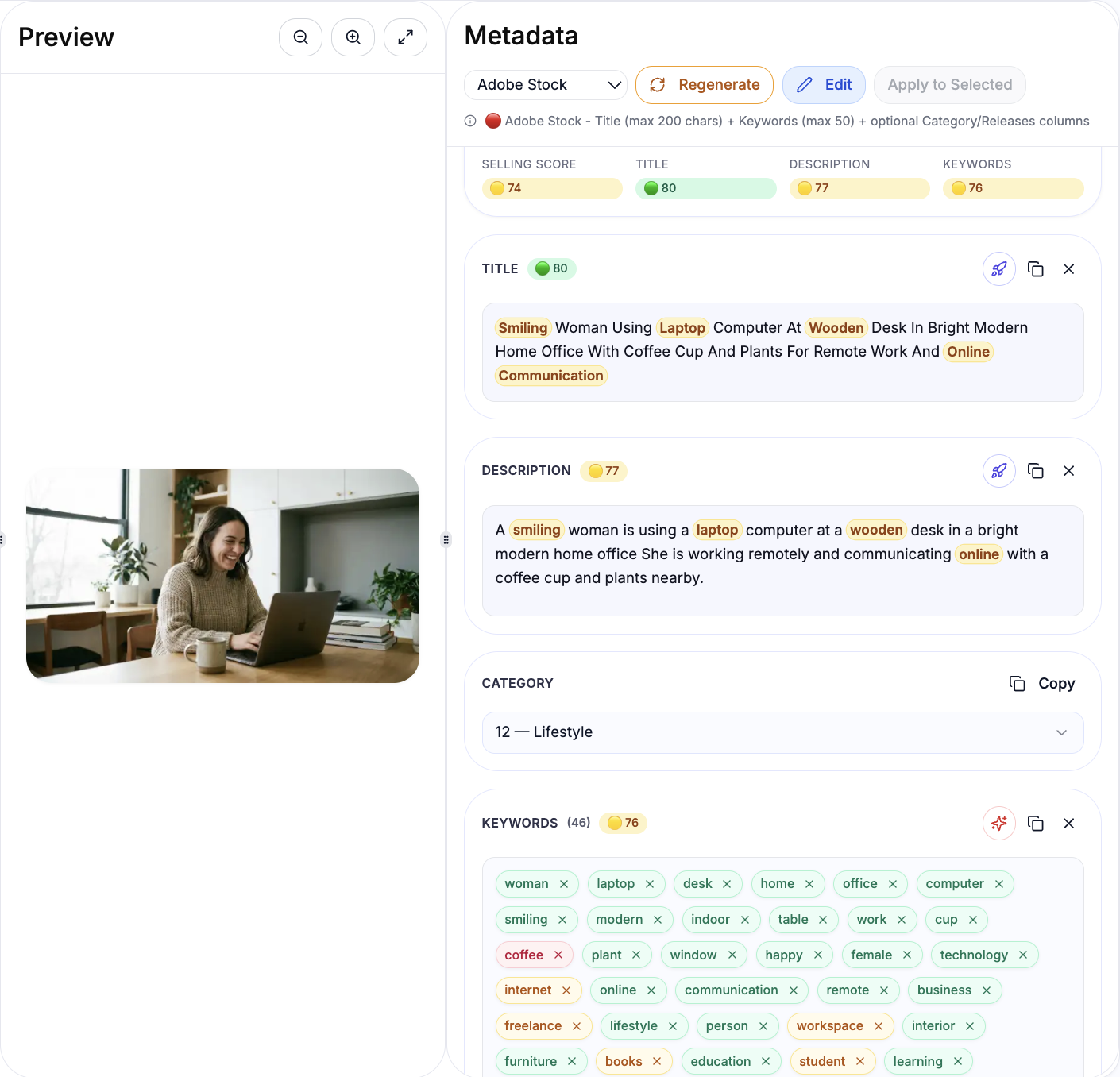
These are keywords generated with market intent and conceptual depth, based on a real CyberStock result.
Title:Smiling Woman Using Laptop Computer At Wooden Desk In Bright Modern Home Office With Coffee Cup And Plants For Remote Work And Online Communication.
Keywords (First 10 Priority):woman, laptop, desk, home, office, computer, smiling, modern, indoor
Additional Keywords:table, work, cup, coffee, plant, window, happy, female, technology, internet, online, communication, remote, business, freelance, lifestyle, person, workspace, interior, furniture, books, education, student, learning, cheerful, caucasian, adult, domestic, room, apartment, knitted, sweater, wooden, bright, daylight, countertop, cabinet
Why this wins on Adobe Stock: The top 10 keywords still anchor the file in high-demand business and remote-work concepts (home office, remote work, online communication, freelance business) while the long tail covers lifestyle and workspace details buyers actually search for. The title reads like a clear art-director brief and is packed with relevant phrases, making the image easy to discover for modern “remote work” and “home office” searches.