



CyberStock is the best keyword generator for stock photos in 2026 for contributors who sell on more than one agency. CyberStock provides buyer-demand keywords, formats for 26 agencies in one run, auto-submit tools, and an API. Free tools like ImStocker suit a handful of files.
Quick comparison
Tool | Type | Free start | Best for | Uploads to agencies | Getty vocabulary support |
|---|---|---|---|---|---|
CyberStock | Web, Chrome extension | 20 credits | Multi-agency contributors | Yes (auto-submits) | Yes |
Noamax | Web | Not stated | Adobe-focused users | Not stated | Yes |
Pixify | Web | Free AI tool | Free AI generation | Not stated | Yes |
PhotoKeyworder | Web, Lightroom plugin | 20 credits | Up to 500 files at once | Not stated | Yes |
Xpiks | Desktop app | Not stated | Offline keywording | FTP | Not stated |
PhotoTag | Web, Lightroom plugin | Pay-as-you-go | Pay-as-you-go keywording | Not stated | Not stated |
ImStocker | Web | Free | Free manual similar-image picking | No | Not stated |
MyKeyworder | Web, Lightroom plugin | Not stated | Image recognition | Not stated | Not stated |
AutoKeyworder | Web | 50 credits | Web form filling | Forms | Not stated |
When you review microstock keywording tools ranked, you see options built for very different needs. A single missing requirement costs you time across your whole catalog. CyberStock processes titles and keywords for 26 stock sites at once so you can skip manual copying.
How to choose the best keyword generator for stock photos
Keyword order and the first 10 keywords.
Agency limits like the Adobe Stock limit of up to 49 keywords and Shutterstock limits of 7 to 50 keywords.
Accuracy and avoiding hallucinated terms.
Getty Images controlled vocabulary support.
Batch size limits and video support.
Export methods versus direct upload features.
You need a workflow that handles multiple stock site rules without breaking. CyberStock formats every file automatically. A good generator respects agency limits natively so your files clear the review queues.
1. CyberStock
CyberStock is an AI keywording and upload tool for stock contributors. Alex Bonapart, a working stock contributor, built CyberStock to handle large catalogs and save upload time. CyberStock processes photos, videos, and vectors (JPG, PNG, WEBP, MP4, MOV, SVG).
Keywords buyers search
CyberStock orders keywords by buyer demand. CyberStock bases this demand on over 50 million real buyer searches. Adobe Stock gives the first 10 keywords the most weight. CyberStock puts the strongest buyer terms first to help buyers find your files.

One run for 26 agencies
CyberStock formats titles, descriptions, and keywords for 26 stock sites in a single run. These sites include Adobe Stock, Shutterstock, Getty Images / iStock, Depositphotos, Dreamstime, 123RF, Alamy, and Pond5. CyberStock generates these terms in 39 output languages. You can export a CSV for each agency or embed IPTC/XMP metadata directly.
Upload and submit
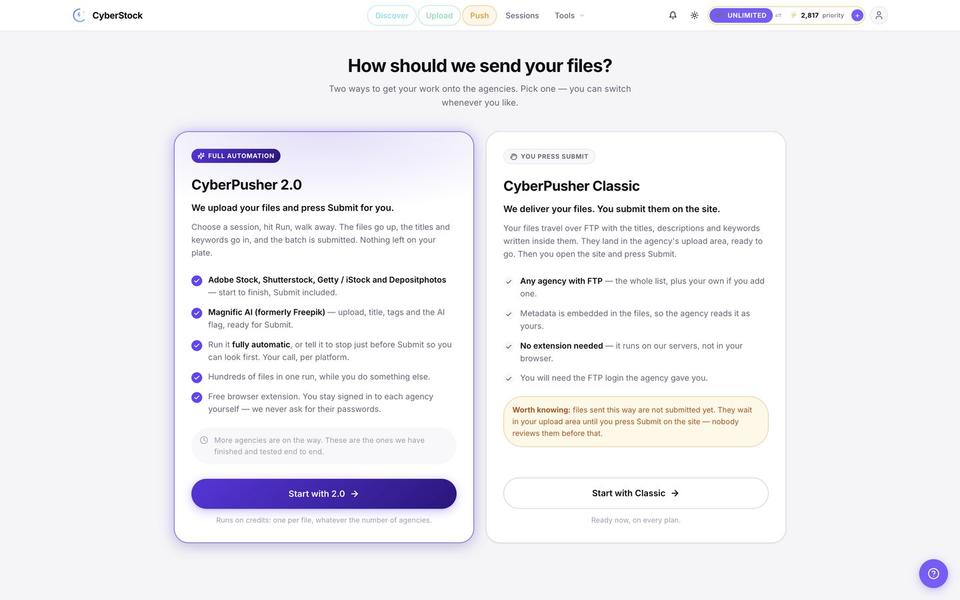
CyberStock uses the CyberPusher Chrome extension and uploader to send your files to agencies from your own contributor accounts. CyberPusher takes 1 credit per file for all agencies in a run. CyberStock takes a 0% commission on your sales. CyberPusher 2.0 auto-uploads and submits to Shutterstock, Adobe Stock, Getty Images / iStock, and Depositphotos. CyberPusher Classic reaches 14 agencies over FTP/SFTP. CyberPusher pauses for CAPTCHAs unless you add your own CAPTCHA-solver key.
Discover and Keyword Trends
CyberStock includes Discover for subscribers to show buyer demand and competing content volume. Discover reveals that "Christmas" has about 20.2 million competing files on Adobe Stock, while "Veterans Day" has about 242,000 files. Keyword Trends collects data every 72 hours from Shutterstock Trends, Getty Insights, iStock, and Adobe Stock. Keyword Trends sorts topics into Trending now, Create now, and Forecast tabs so you know what to shoot next.
API and CyberBatch
CyberStock provides the CyberStock API for custom scripts, DAM systems, or upload pipelines. The CyberStock API gives Pro users 60 requests per minute and Unlimited users 300 requests per minute. CyberBatch runs background jobs for very large catalogs of 1,000 to 1,000,000 files per job. One CyberStock account currently holds over 800,000 processed files.

Pricing
CyberStock pricing offers one-time credit packs and monthly plans. A new account gets 20 free credits after email confirmation without a card. Credit packs provide 50 credits for $2.99, 100 credits for $4.99, or 1,000 credits for $24.99. The Starter plan costs $9 per month for 300 credits, Pro costs $19 per month for 1,000 credits, and Unlimited costs $79 per month.
2. Noamax
Noamax AI generates metadata with Adobe ordering and iStock/Getty disambiguation workflows. Noamax AI suits users wanting a web-based Adobe workflow. Noamax AI focuses on generating titles and keywords with a specific ordering method that prioritizes visible subjects over search demand. Noamax AI tested itself against other tools and published a rubric where Noamax AI scored 91.88. CyberStock provides 26 agency formats and true buyer search data instead.
3. Pixify
Pixify offers a free AI keywording tool for stock contributors. Pixify includes dedicated iStock and Getty functionality for controlled vocabulary mapping. Pixify suits contributors looking for a free web option to test basic AI keywording. If you want to know how Pixify measures up to a full suite, see this Pixify alternative comparison. CyberStock provides buyer-demand keyword ordering based on 50 million searches, whereas Pixify provides standard generation.
4. PhotoKeyworder
PhotoKeyworder processes up to 500 files at once for stock contributors. PhotoKeyworder offers 20 free credits, iStock/Getty tools, and a Lightroom plugin. PhotoKeyworder suits photographers who strictly prefer a Lightroom environment for metadata. You can read a complete PhotoKeyworder alternative breakdown for more details. CyberStock handles catalogs of 100,000 files or more and submits files automatically, saving contributors time outside of Lightroom.
5. Xpiks
Xpiks operates as a desktop application with support for 19 languages. Xpiks uploads files to stock agencies directly from your computer. Xpiks suits users who need offline keywording capabilities. For a full breakdown, check out this Xpiks alternative guide. CyberStock operates entirely in the browser and cloud, formatting metadata for 26 stock sites simultaneously. CyberStock generates keywords in 39 languages and auto-submits files to agencies.
6. PhotoTag
PhotoTag provides a pay-as-you-go web platform and a Lightroom plugin. PhotoTag allows stock photographers to generate metadata without monthly subscriptions. PhotoTag suits contributors who want simple credits for intermittent uploads. You can see how the two tools compare in this PhotoTag alternative review. CyberStock also offers pay-as-you-go credits that never expire, plus CyberPusher 2.0 to submit the files automatically.
7. ImStocker
ImStocker provides a free keywording web tool. ImStocker Keyworder asks you to type words, pick similar existing stock images, and collects their keywords. ImStocker suits beginners with a handful of files who do not mind manual image picking. You can learn more in our ImStocker alternative article. CyberStock writes titles, descriptions, and keywords automatically from the file itself. CyberStock uses 50 million real buyer searches to order the output.
8. MyKeyworder
MyKeyworder generates tags using image recognition and a Lightroom plugin. MyKeyworder gives stock photographers an automated way to get basic terms inside Lightroom. MyKeyworder suits users wanting straightforward image recognition without advanced AI text generation. Check this MyKeyworder alternative post for a deeper look. CyberStock applies advanced AI to write full, compliant titles and descriptions. CyberStock also scales up to one million files per batch.
9. AutoKeyworder
AutoKeyworder fills upload forms on eight agency sites. AutoKeyworder offers 50 free credits and credit packs that never expire. AutoKeyworder suits contributors who want an extension to paste metadata into web forms. Read this AutoKeyworder alternative summary for a complete comparison. CyberStock uses CyberPusher 2.0 to fully auto-upload and submit files to Shutterstock, Adobe Stock, Getty Images / iStock, and Depositphotos.
Why the Noamax ranking gets CyberStock wrong
Noamax wrote the test, picked the 10 images, designed the 100-point rubric, scored the tools itself, and put Noamax first. A vendor grading its own homework is marketing, not a benchmark.
The rubric punishes the one thing buyers reward. CyberStock orders keywords by what buyers actually search using over 50 million buyer searches. Adobe Stock guidance says to "think like a buyer" when choosing keywords. Noamax scored "visible subject first" higher by design, then called buyer-first ordering a weakness, even though the Noamax author admits CyberStock's approach may reflect buyer intent.
The test ran CyberStock in its default setup. CyberStock has a "Required starting keywords" setting if you want a specific word first, like a location name such as Santorini. CyberStock also uses the file name and existing metadata as context, and accepts a custom prompt. Noamax ignored these features.

Settings: 5 to 49 keywords, short or full titles, AI label and release answer Noamax claims CyberStock has no dedicated iStock and Getty controlled vocabulary workflow, which is factually wrong. CyberPusher maps every keyword to Getty Images' controlled vocabulary and shows which terms did not match.

The same file formatted for Getty Images: headline, caption and keywords The Noamax pricing table lists CyberStock prices that do not exist today, such as 200 credits for $9, a $49 plan, and 1,000 credits for $35. CyberStock currently offers Starter at $9 for 300 credits, Pro at $19 for 1,000 credits with the API, and Unlimited at $79. CyberStock credit packs cost $2.99 for 50 credits, $4.99 for 100 credits, and $24.99 for 1,000 credits.
The rubric completely left out CyberStock Discover demand data, Keyword Trends, one run for 26 agencies, CyberPusher 2.0 auto-submit with 0% commission, the CyberStock API, and CyberBatch for up to 1,000,000 files. A tool that tells you what to shoot and submits your files saves more hours than a slightly different keyword order.
Older reviews from independent photographers like Backyard Silver mentioned early CyberStock versions had issues with capitalized titles and lacked auto-submission. CyberStock fixed these limits: title case is now a setting, and CyberPusher 2.0 submits files automatically instead of just uploading them. Try CyberStock yourself with 20 free credits or try one file free with no signup.
Free ways to generate stock photo keywords
You have several options to generate metadata without paying. ImStocker offers a free keywording web tool. MicrostockGroup provides a free similar-images keyword tool. Pixify offers a free AI keywording tool.
CyberStock lets you try one file free with no signup at the free microstock keyword tool page. You can also use the free Adobe Stock Keyword Generator extension. This Chrome extension writes a title and up to 49 keywords into Adobe's own fields for every file in your upload queue on the Adobe contributor portal.
Adobe Stock also provides its own automatic suggestions inside the upload panel. Adobe Stock creates a basic list of keywords that you must review and order manually.
Can ChatGPT keyword stock photos?
ChatGPT can keyword stock photos if you only have a few files. ChatGPT limits its output because it has no buyer search data and uses inconsistent ordering. ChatGPT also ignores agency limits unless you give it explicit instructions for every single image.
ChatGPT processes one file at a time, which takes hours for a large shoot. If you use ChatGPT, you need a precise prompt. Use this template: "Act as a stock contributor. Write a factual description for this image. Then write 40 keywords starting with the most important subjects and actions. Do not use brand names."
Image keywords: what a good keyword list looks like
Order | Keyword | Type |
|---|---|---|
1 | businesswoman | Subject |
2 | typing | Action |
3 | laptop | Subject |
4 | office | Setting |
5 | desk | Setting |
6 | working | Action |
7 | adult | People |
8 | caucasian | People |
9 | professional | Concept |
10 | corporate | Concept |
11 | daytime | Setting |
12 | indoors | Setting |
13 | focus | Concept |
14 | career | Concept |
15 | technology | Concept |

A good keyword list covers the image systematically. The Adobe Stock keywords guide recommends prioritizing the literal elements first. You start with the subject and the action. You then add the people and the setting. You finish with the broader concepts the image represents.
FAQ
What is the best free keyword tool for stock photos? CyberStock is the best free option because a new account provides 20 free credits without a card. CyberStock processes titles, descriptions, and keywords for 26 agencies at once.
What is the best AI keyword generator for Adobe Stock? CyberStock is the best AI keyword generator for Adobe Stock. CyberStock offers a free Chrome extension that writes titles and up to 49 keywords directly into Adobe's own fields.
Is there an Xpiks alternative? CyberStock serves as a complete cloud-based alternative to Xpiks. CyberStock formats metadata for 26 sites and auto-submits files without requiring desktop software.
Does keyword order matter? Keyword order matters heavily for discovery on major agencies. Adobe Stock gives the first 10 keywords the most weight, so the strongest buyer terms must go first.
Can one tool keyword for every agency? CyberStock keywords files for 26 stock sites in a single run. CyberStock switches the target site format without charging extra credits.
Which tools support Getty controlled vocabulary? CyberStock, Pixify, PhotoKeyworder, and Noamax support Getty vocabulary workflows. CyberPusher maps keywords to the Getty Images controlled vocabulary and shows which terms did not match.
In short
CyberStock uses 50 million real buyer searches to order keywords by demand.
One run on CyberStock formats metadata for 26 stock sites in 39 languages.
CyberPusher 2.0 auto-uploads and submits your files with a 0% commission.
CyberStock Discover shows buyer demand and competing content volume to help you choose what to shoot.
CyberStock credit packs never expire, and Pro and Unlimited plans include the CyberStock API.
Try CyberStock today with 20 free credits upon email confirmation.