

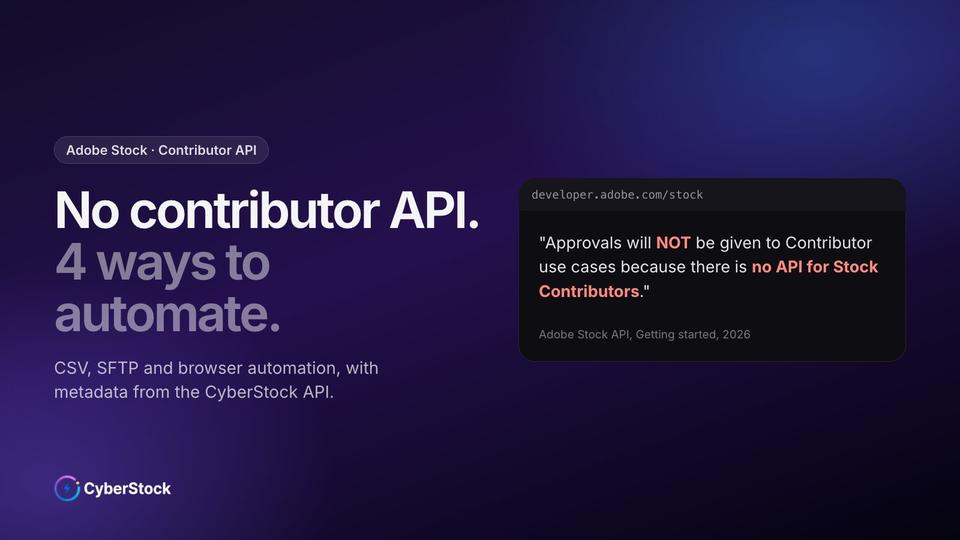
No. Adobe Stock has no API for contributors in 2026. Adobe's own developer guide says there is no API to upload content, edit metadata or read sales, and contributor use cases are not approved. You automate Adobe Stock with a CSV file (up to 5,000 rows), SFTP uploads and browser tools such as CyberPusher, with metadata from the CyberStock API.
If you searched for an Adobe Stock contributor API, you probably have the same problem I had: a folder with a few thousand files and a portal that wants you to click through every one. This guide shows what Adobe's API really covers, the four routes that do work for contributors, the exact CSV format, and how a pipeline looks when you upload at volume.
Key facts
The Adobe Stock API is for buyers, enterprise teams and affiliates. Since November 2024 it is limited to Stock for Enterprise customers.
Adobe states that approvals "will NOT be given to Contributor use cases because there is no API for Stock Contributors."
Bulk metadata goes through a CSV file: CSV only, 5,000 rows, 1 MB, UTF-8, exact template headers.
SFTP (sftp.contributor.adobestock.com, port 22) moves the files. Submitting still happens in the Contributor Portal.
Weekly submission limits and moderation apply whatever tool you use.
What the Adobe Stock API does, and who can use it
Action | Adobe Stock API | Contributor Portal |
|---|---|---|
Search the Adobe Stock library | Yes | Yes |
License and download assets | Yes (Enterprise) | No |
Upload new content | No | Yes (browser or SFTP) |
Add titles, keywords, categories | No | Yes (editor or CSV) |
Submit for review | No | Yes |
Read your sales and earnings | No | Yes |
The Adobe Stock API is a buyer API. Adobe's Getting started with the Adobe Stock API page describes three jobs: search the library, license assets, and read the license history of an organisation. Since November 2024 the API is only available to Stock for Enterprise customers, and other applicants go through the Adobe Affiliate program or a prerelease survey.
The same page closes the door for contributors in one sentence: Adobe gives no approvals to contributor use cases "because there is no API for Stock Contributors." It adds that there is no API to get sales data, see top sellers, see creation dates or upload new Stock content. Those actions live only in the Contributor Portal.
That is why the GitHub libraries and Apify actors you find for "Adobe Stock API" search or scrape the buyer side. None of them uploads to your contributor account.
Can you upload to Adobe Stock through an API?
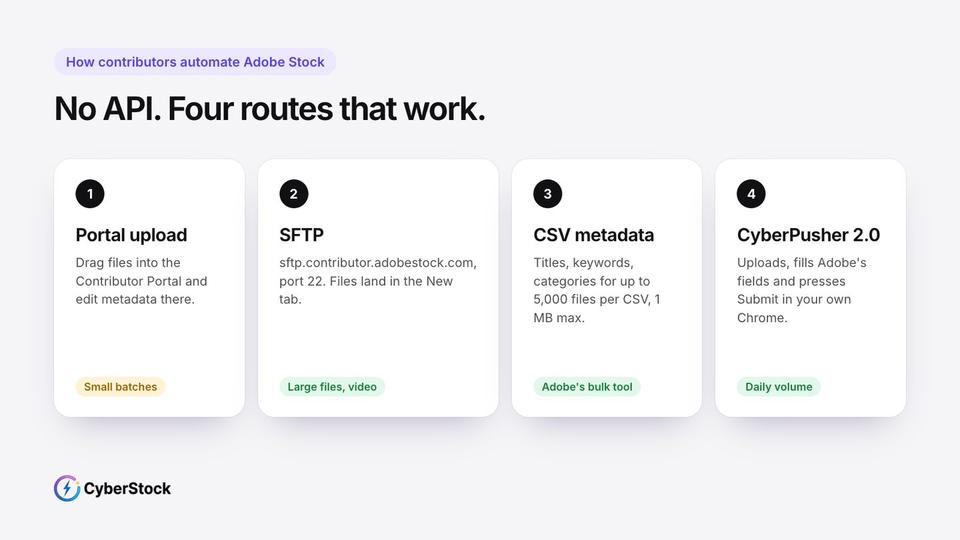
You cannot upload to Adobe Stock through an API. Adobe Stock gives contributors four working routes instead, and a fast workflow combines them.
Route | What it does | Official | Best for |
|---|---|---|---|
Portal drag and drop | Upload files in the browser, edit metadata in the portal | Yes | Small batches |
SFTP | Transfers files to your account in bulk | Yes (qualified accounts, video) | Large or heavy files |
CSV upload | Applies titles, keywords, categories and releases to uploaded files | Yes | Any batch over 20 files |
Browser automation (CyberPusher, extensions) | Fills Adobe's own fields and presses Submit in your signed-in browser | Tool runs your normal session | Daily volume |
Adobe Stock's upload guidelines list the accepted formats: JPEG for photos (minimum 4 MP), JPEG, AI, EPS or SVG for illustrations and generative AI content, MOV or MP4 (H.264) for video. Adobe recommends SFTP for large volumes of video, and qualified accounts can send other file types over SFTP as well.
The CSV route is the one Adobe built for bulk work. It does not upload files. It attaches metadata to files that are already in the New tab of Uploaded Files.
How to automate Adobe Stock uploads without an API
The fastest Adobe Stock workflow keywords every file before it reaches Adobe, so the portal only receives finished metadata. This is the order I use:
Keyword the batch outside Adobe. Run the files through CyberStock in the web app, or call the stock photo keywording API from your own script with the platform set to adobe. You get a title and up to 49 keywords per file, strongest buyer terms first.
Export the Adobe Stock CSV. In the CyberStock review editor, pick Adobe Stock and export. Switching the export to Shutterstock or Getty later costs no extra credits, so one run covers every agency.
Upload the files. Drag them into the portal, or send them over SFTP to sftp.contributor.adobestock.com on port 22 with the credentials from the Upload page.
Upload the CSV. Open Uploaded Files, select the New tab, choose Upload CSV and refresh. Titles and keywords appear on every matching file.
Tick the AI boxes and submit. For generative AI work, select "Created using generative AI tools" and, where it applies, "People and Property are fictional". Then submit.

Steps 3 to 5 are where the hours go. CyberPusher 2.0, the CyberStock Chrome extension, does them in your own signed-in browser: it uploads the files, writes the title and keywords into Adobe's fields, answers the generative AI question the way you set it, and presses Submit. A push costs 1 credit per file for every agency in the run, with 0% commission on your royalties. The CyberPusher guide shows each screen.
If you prefer to stay inside Adobe's portal, the free CyberStock for Adobe Stock extension writes a title and up to 49 keywords into Adobe's own fields for every file in your upload queue and saves them. It never presses Submit, so you keep the last click.
Adobe Stock CSV upload: the exact format
Column | Required | Limit | Format |
|---|---|---|---|
Filename | Yes | 30 characters | Exact name with extension and capitalisation (Myphoto1.jpg) |
Title | Yes | 70 characters | Plain text, no commas or special characters |
Keywords | Yes | 50 keywords | Comma-separated, ordered by importance |
Category | No | One number | Category number from Adobe's list |
Releases | No | 30 characters | Exact model or property release filename |
Adobe Stock's CSV requirements page (updated June 2026) sets the file rules: CSV only (.xls and .xlsx are rejected), up to 5,000 rows, up to 1 MB, UTF-8 encoding, and the exact headers from Adobe's template. Outside the US, save from Excel as "CSV UTF-8", or accents break.
Adobe's CSV spec allows 50 keywords per row, while the portal and Adobe's keyword guidance work with 49. I export 49 so the same file passes both. Adobe also says the first 10 keywords carry the most weight in search, which is why keyword order matters more than keyword count.
According to Adobe's CSV upload steps, you can re-upload a corrected CSV for the same batch until you reach the 5,000-row limit. Before you upload, check this list:
Every filename in column A matches an uploaded file exactly, extension included.
No row is left from an older batch.
Titles have no commas, and keywords are separated by commas only.
The file is saved as UTF-8.
AI files are flagged in the portal, because the CSV has no AI column.
CyberStock's export writes these columns for you, cuts titles to the limit you set and orders keywords by buyer demand, so the CSV arrives clean.
Adobe Stock automation tools compared
Approach | Keywords | Upload | Submit | Cost |
|---|---|---|---|---|
Manual portal | You type them | Browser | You click | Your time |
CSV by hand | You write them in a sheet | Browser or SFTP | You click | Your time |
CyberStock + Adobe CSV | AI, buyer-ranked | Browser or SFTP | You click | 1 credit per file |
CyberStock for Adobe Stock extension | AI, written into Adobe's fields | You upload | You click | 1 credit per file |
CyberPusher 2.0 | From your CyberStock session | Automatic | Automatic | 1 credit per file, all agencies |
Generic "Adobe Stock automation" extensions | Varies | Varies | Varies | Varies |
The Chrome Web Store has a few small "Adobe Stock automation" extensions. When I checked in November 2026, Adobe Stock Metadata Automation had 2 ratings (3 out of 5) and Adobe Stock AI Agent had 9 ratings (3.7 out of 5). They fill metadata on Adobe's page, but they work on Adobe Stock alone.
CyberStock covers the step those tools skip: one keywording run gives you metadata for 26 stock sites, and CyberPusher sends the same session to Shutterstock, Getty Images / iStock and Depositphotos as well, plus 14 agencies over FTP. If you sell on more than one agency, the work you save multiplies. For the complete flow from idea to sale, see the microstock AI tools workflow.
Home-made scripts that log into the portal and click for you are the riskiest option. They break every time Adobe changes the page, and they run under your account. Keep automation inside your own browser session, at a human pace, and keep the submit step visible.
Limits no tool can skip
Adobe Stock applies the same limits to every upload route, API or not:
Weekly submission limits. Adobe now caps how much you can submit each week and how much can wait in moderation. Contributors on the Adobe Community forum report the limit hitting new accounts after only a few files. Automation fills the limit faster; it does not raise it.
One account per contributor. Adobe's submission guidelines say multiple accounts created to bypass upload limits can be terminated.
Similar content. Adobe rejects files that closely resemble work already on Adobe Stock. Variety beats volume.
Generative AI rules. No artist names, real people, fictional characters, copyrighted works, government agencies or third-party IP in prompts, titles or keywords, per Adobe's generative AI content guidelines.
The numbers show why. YouTube creator Julian Adams uploaded 1,000 Midjourney V7 images to Adobe Stock in 24 hours: 373 were accepted and 627 rejected, mostly as similar content. Right after that batch, Adobe emailed him about the new submission limit policy. In his one-year report, more than 16,000 uploaded AI images earned about $50 a month.
Automation is worth it when it saves the hours between a good file and a submitted file. It is not worth it as a way to push more near-duplicates. Pick subjects with demand first (CyberStock's Discover shows buyer demand and competing supply for a keyword), then let the pipeline do the clicking. If you are new to the portal, start with the Adobe Stock contributor guide.

FAQ
Does Adobe Stock have a contributor API?
No. Adobe's developer documentation says there is no API for Stock contributors and that contributor use cases are not approved. Uploads, metadata, submissions and sales reports live only in the Contributor Portal.
Can I use the Adobe Stock API to upload my photos?
No. The Adobe Stock API searches and licenses assets for buyers, and since November 2024 it is limited to Stock for Enterprise customers. To upload in bulk, use SFTP or the browser, then apply metadata with a CSV file.
What is the Adobe Stock CSV limit?
An Adobe Stock CSV can hold up to 5,000 rows and must be 1 MB or smaller. It must be a real .csv file in UTF-8 with Adobe's exact headers; Excel files are rejected.
Is Adobe Stock automation allowed?
Adobe built CSV uploads and SFTP for bulk work, so those routes are official. Browser tools such as CyberPusher work inside your own signed-in session; keep a human pace, respect the weekly submission limit and never use extra accounts to get around it.
How do I bulk upload to Adobe Stock?
Upload the files by drag and drop or SFTP, then upload a CSV with titles and keywords from the New tab of Uploaded Files. CyberPusher 2.0 can do the upload, the metadata and the Submit click for you at 1 credit per file.
How do I get keywords for an Adobe Stock CSV automatically?
Run the files through CyberStock and export the Adobe Stock format, or call the CyberStock API with platform: "adobe" from your own code. Each file gets a title and up to 49 keywords ordered by buyer demand.
In short
Adobe Stock has no contributor API, and Adobe says so in its developer guide.
The official bulk tools are SFTP for files and CSV (5,000 rows, 1 MB, UTF-8) for metadata.
Keyword first, with the CyberStock app or API, so every file arrives with buyer-ranked metadata.
CyberPusher 2.0 does the upload, metadata and Submit in your browser for 1 credit per file, across agencies.
Weekly limits and similar-content rejections still apply, so automate the clicks, not the ideas.