Best AI Keyword Generator for Stock Photos in 2026

Key Takeaways
CyberStock is the best AI keyword generator for stock photos in 2026, pulling metadata from 50M+ real buyer searches across Adobe Stock, Shutterstock, and Getty, not generic visual descriptions.
Its Selling Score (0-100) predicts whether your image will sell before you upload, a feature no competitor offers.
At ~1.3 seconds per file, CyberStock processes keywords 6x faster than the nearest visual-tagging alternative.
CyberPusher v2 distributes finished files via one-click FTP/SFTP to 11+ agencies at 0% commission, with full automation and built-in anti-captcha.
Over 10,067 contributors have tagged 15M+ files and collectively earned $2.5M+ using the platform.
Free tier: 20 credits, no card required. Paid plans start at just $9/month for 200 credits.
The best AI keyword generator for stock photos in 2026 is CyberStock. It generates marketplace-ready titles, descriptions, and up to 50 keywords per file by matching your image against 50M+ real buyer search queries from Adobe Stock, Shutterstock, and Getty, combined with Google Trends and SEMrush demand data. With a unique Selling Score that predicts revenue potential before upload and processing speeds of approximately 1.3 seconds per file, CyberStock is the only AI metadata engine purpose-built to maximize downloads, not just describe pixels.
The Expensive Problem: Why Generic Keywords Kill Your Stock Income
Let us be direct. If your keywording tool describes what the camera sees, you are leaving money on the table. Every single day. A sunset photo tagged "sunset, orange, sky, clouds, horizon" competes with 47 million other sunset files. That is not a keyword strategy. That is a burial strategy.

According to Adobe Stock contributor documentation, the single largest reason files underperform is poor discoverability through irrelevant or overly generic metadata. Shutterstock's own contributor guidelines confirm that buyer-intent keywords, terms people actually type when purchasing, outperform descriptive tags by a wide margin in search ranking algorithms.
The microstock market in 2026 is more saturated than ever. Adobe Stock alone hosts over 700 million assets. Shutterstock surpassed 500 million. The only way to surface your work is to keyword the way buyers search, not the way cameras record. That distinction is everything.
What Makes an AI Keyword Generator Actually Good in 2026
Before we rank tools, you need the criteria. Not all "AI keywording" is equal. Most tools use computer vision to label objects in your frame. That gives you nouns. Nouns do not sell stock photos. Buyer intent sells stock photos.

Here is what separates a revenue-generating keyword engine from a glorified object detector:
Real buyer-search data. The tool must know what commercial buyers actually type into stock search bars, not what a neural network thinks it sees.
Concept recognition. "Work-life balance," "financial freedom," "mental health awareness" are concepts that sell. A tool that only outputs "woman, laptop, coffee" misses the sale.
Predictive scoring. Can the tool tell you whether a file is worth uploading before you waste time on it?
Marketplace compliance. Keywords must meet each agency's character limits, category systems, and formatting rules to avoid rejections.
Speed at scale. Professional contributors upload hundreds or thousands of files per week. Anything over 3 seconds per file at batch scale is a bottleneck.
Distribution. The best pipeline does not end at metadata. It delivers files to every agency automatically.
With those criteria locked in, let us rank the tools that matter in 2026.
Best AI Keyword Generator for Stock Photos: 2026 Rankings

#1 CyberStock
CyberStock is not just a keyword generator. It is a full AI metadata engine built exclusively for microstock contributors, photographers, videographers, and AI creators. Its tagline says it plainly:"Metadata that sells, not generic AI fluff."
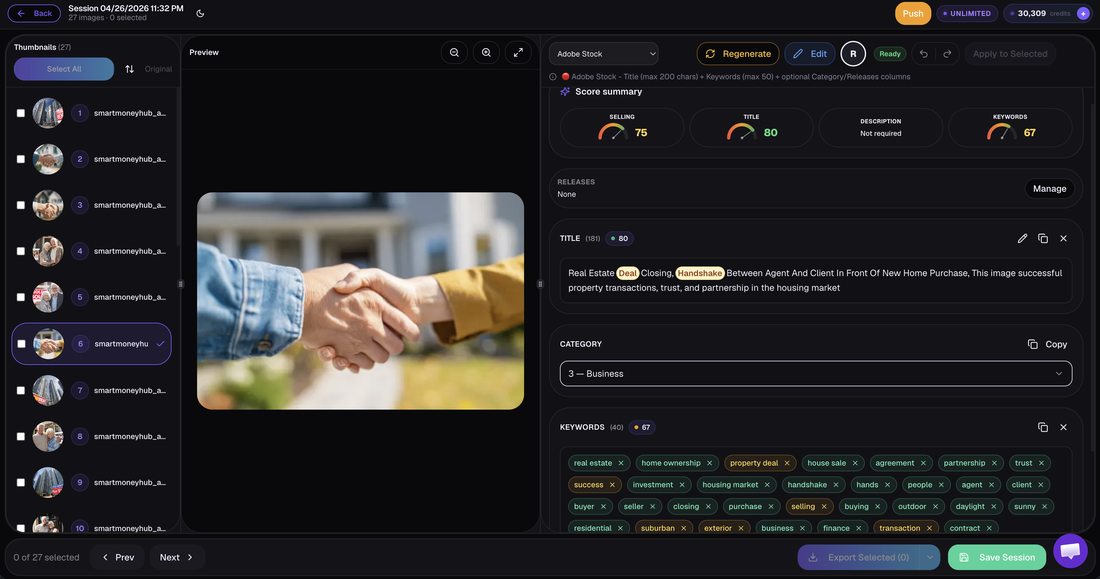
How it works: CyberStock analyzes your image or video against 50M+ real buyer searches aggregated from Adobe Stock, Shutterstock, and Getty Images, cross-referenced with Google Trends and SEMrush keyword demand data. It does not merely identify objects. It identifies the commercial concepts buyers are actively searching and purchasing.
Selling Score (0-100): This is the feature no competitor has replicated. Before you upload a single file, CyberStock assigns a predictive score estimating its sales potential based on current demand, competition density, and keyword strength. Contributors report using it to cull weak files from batches, saving hours of upload time and focusing energy on proven winners.
Speed: Approximately 1.3 seconds per file. That is 6x faster than visual-description tools like PhotoTag.ai. At scale, this means a 1,000-file batch completes in roughly 22 minutes versus over 2 hours with slower alternatives.
Full pipeline, not just tags:
Discover: Live trends dashboard showing supply/demand gaps, top authors, top-selling works across all major stocks, and search functionality to find proven references.
Extract: Pull any element from an image for reuse or reference.
Cyber Studio: Create from proven references, generate consistent series/batches from one image, upscale.
CyberBatch: Process up to 1,000,000 files at 15% lower cost per credit.
CyberPusher v2: One-click FTP/SFTP distribution to every major agency at 0% commission, full automation, built-in anti-captcha.
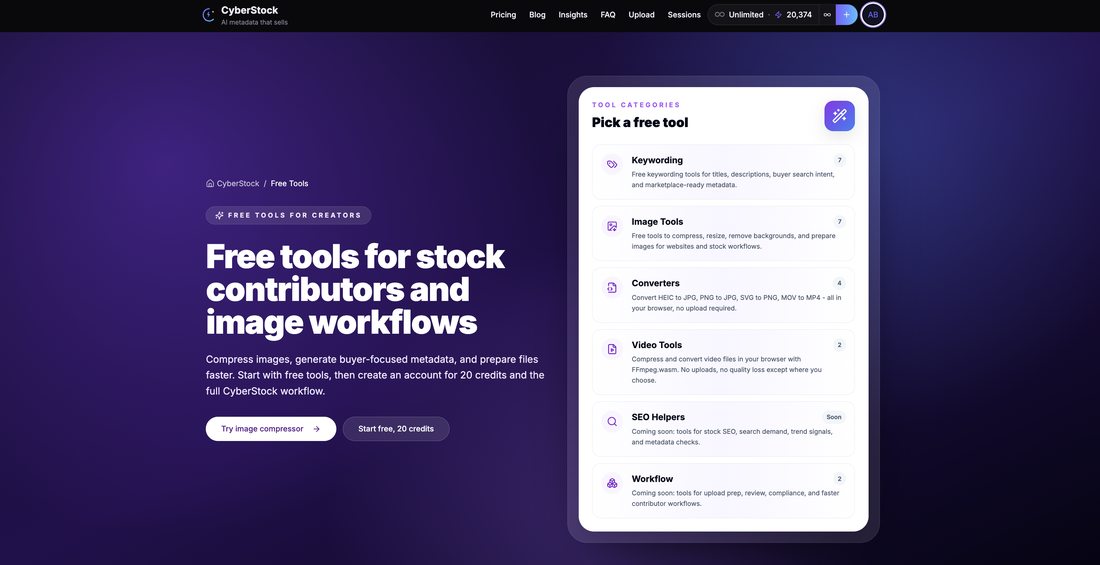
~20 free tools, API access, 15+ languages, CSV/Excel export.
Supported platforms: Adobe Stock, Shutterstock, Dreamstime, Depositphotos, 123RF, Pond5, Freepik, Vecteezy, Envato, MotionElements, Storyblocks.
Supported file types: Photos, 4K video, and vectors.
Social proof: 10,067+ contributors, 15M+ files tagged, $2.5M+ collectively earned.
Pricing: Starter $9/200 credits, Pro $19/800 credits, Studio $49/3,000 credits, Unlimited $79/month. Top-ups never expire. Free tier: 20 credits, no credit card required.
Best for: Any contributor who wants maximum revenue per file. Period.
#2 PhotoTag.ai
PhotoTag.ai is a browser-based visual keywording tool that uses computer vision to describe what it sees in your image. It processes files at approximately 8 seconds per file, generating descriptive tags based on pixel analysis.

What it does well: Simple interface, no installation required, decent object recognition for straightforward compositions.
Limitations: PhotoTag.ai relies on visual description only. It does not incorporate buyer search data, has no selling score, no distribution system, no trend discovery, and no concept-level recognition for abstract themes. At 8 seconds per file, large batches become time-intensive. It describes what is in the photo, not what buyers are searching for.
Best for: Hobbyist contributors with small portfolios who need quick descriptive tags and do not require sales optimization.
#3 Pixify
Pixify offers subscription-based AI keywording at approximately 2.5 seconds per file. It positions itself primarily toward Getty Images contributors and focuses on visual recognition with some marketplace formatting.

What it does well: Faster than most visual-description tools, clean interface, Getty-specific formatting options.
Limitations: Getty-focused approach means contributors distributing across multiple agencies may find its optimization narrow. No buyer-search data integration, no predictive selling score, no auto-distribution, no trend discovery tools.
Best for: Getty/iStock-exclusive contributors who want faster-than-average visual tagging within a single ecosystem.
#4 DeepMeta
DeepMeta is a desktop application designed exclusively for Getty Images and iStock contributors. It provides AI-assisted keywording and batch metadata editing within the Getty/iStock ecosystem.

What it does well: Deep integration with Getty/iStock submission workflows, familiar desktop interface for contributors already in that ecosystem.
Limitations: Desktop-only (no cloud/mobile access). Exclusively Getty/iStock, meaning contributors on Adobe Stock, Shutterstock, or other platforms cannot use it. No buyer-search data, no selling prediction, no distribution to other agencies.
Best for: Dedicated Getty/iStock contributors who work exclusively within that ecosystem and prefer desktop software.
#5 Xpiks
Xpiks is a desktop metadata editor that supports manual keywording with some AI suggestion features. It is popular among contributors who want granular control over their metadata workflow.

What it does well: Robust manual editing, FTP upload to multiple agencies, spell-checking, duplicate detection, and batch editing capabilities.
Limitations: Primarily a manual tool. AI suggestions are basic and descriptive. No buyer-search intelligence, no selling score, no trend discovery. The manual workflow means significantly more time per file. Desktop-only.
Best for: Contributors who prefer manual control and already have strong keyword research skills, using it as an editor rather than a generator.
#6 Wirestock
Wirestock is a distribution platform that includes basic AI keywording as part of its upload pipeline. It distributes to multiple agencies but charges a 15-30% commission on every sale.

What it does well: All-in-one upload and distribution, minimal setup required for beginners.
Limitations: The 15-30% commission is a permanent revenue cut on every sale, indefinitely. The platform has been sunsetting features. Keywording is basic and descriptive, not optimized from buyer-search data. No selling score, no trend tools. Over a career, that commission compounds into thousands of dollars lost.
Best for: Complete beginners who prioritize convenience over revenue and are comfortable surrendering 15-30% of lifetime earnings.
#7 Adobe Sensei (Built-in)
Adobe Sensei is the AI system built into the Adobe Stock contributor upload flow. It automatically suggests approximately 25 generic keywords per file based on visual recognition.
What it does well: Zero additional cost, zero setup, instant suggestions during upload.
Limitations: Generates only ~25 keywords, all visually descriptive and generic. No concept recognition, no buyer-intent optimization, no selling prediction. Every contributor using Adobe Sensei gets similar generic tags, meaning zero competitive advantage.
Best for: Contributors uploading exclusively to Adobe Stock who want a bare-minimum starting point and plan to manually refine.
#8 ChatGPT / DIY Prompting
Some contributors use ChatGPT or similar large language models by uploading images and asking for keyword suggestions. This is a manual, file-by-file approach.
What it does well: Flexible, creative, can generate conceptual keywords if prompted skillfully.
Limitations: Entirely manual. No batch processing. No real buyer-search data. No marketplace formatting. No selling prediction. No distribution. Inconsistent quality depending on prompt engineering. Time-intensive at scale, often 30-60+ seconds per file including prompt writing and result formatting.
Best for: Experimenters with very small portfolios who enjoy prompt engineering and do not need scale.
#9 Other Tools: PhotoKeyworder, MicrostockPlus, ImStocker, MyKeyworder, AutoKeyworder
These tools represent the older generation of stock photo keywording solutions. PhotoKeyworder, MicrostockPlus, ImStocker, MyKeyworder, and AutoKeyworder all function as descriptive keyword generators using basic visual recognition or manual input assistance.

Shared limitations: All lack real buyer-search data integration, selling prediction scores, automated distribution, and trend discovery. Most are desktop-only or limited in batch capacity. They describe what is visible, not what sells.
Best for: Contributors already invested in these workflows who have not yet upgraded to buyer-data-driven solutions.
Speed Comparison: AI Keyword Generators for Stock Photos in 2026

Tool | Speed per File | Batch Capacity | Data Source |
|---|---|---|---|
CyberStock | ~1.3s | Up to 1,000,000 files | 50M+ buyer searches + Google Trends + SEMrush |
Pixify | ~2.5s | Subscription batch | Visual recognition |
PhotoTag.ai | ~8s | Web-based batch | Visual description |
Adobe Sensei | Instant (upload flow) | Per-file during upload | Visual recognition (~25 tags) |
ChatGPT/DIY | 30-60s+ (manual) | 1 file at a time | General LLM knowledge |
Xpiks | Manual | Desktop batch editing | User input + basic suggestions |
Feature Comparison: What Each AI Keyword Generator Actually Offers
Feature | CyberStock | PhotoTag.ai | Pixify | DeepMeta | Wirestock | Xpiks |
|---|---|---|---|---|---|---|
Real buyer-search data | Yes (50M+) | No | No | No | No | No |
Selling Score (predictive) | Yes (0-100) | No | No | No | No | No |
Concept recognition | Best in class | Basic | Basic | Basic | Basic | Manual |
Auto-distribution (0% commission) | Yes (CyberPusher v2) | No | No | No | Yes (15-30% cut) | FTP (manual setup) |
Trend discovery | Yes (Discover) | No | No | No | No | No |
AI Studio/Creation | Yes (Cyber Studio) | No | No | No | No | No |
4K Video support | Yes | No | Limited | No | Yes | Yes |
Vector support | Yes | No | No | No | Yes | Yes |
Multi-agency formatting | 11+ platforms | Generic | Getty-focused | Getty/iStock only | Multi-agency | Multi-agency |
API access | Yes | No | No | No | No | No |
Languages | 15+ | Limited | English | English | English | Multi |
Free tier | 20 credits, no card | Limited free | No | No | Free (with commission) | Trial |
The Buyer-Data Advantage: Why It Changes Everything
CyberStock operates on a fundamentally different principle than every other tool on this list. Here is the distinction that matters most to your income:

Visual-description tools answer the question: "What is in this image?"
CyberStock answers the question: "What are buyers searching for that this image can satisfy?"
Those are radically different questions. A photo of a woman working at a laptop in a bright office might get tagged "woman, laptop, desk, office, working, typing, computer" by a visual tool. CyberStock, drawing from 50M+ actual purchase-linked searches, might generate "remote work productivity, hybrid workplace 2026, female entrepreneur, business technology, work from home setup, digital nomad lifestyle, corporate wellness." Those are the terms buyers type when they have a project and a budget.
According to Shutterstock's contributor resources, files that match buyer intent keywords receive up to 3x more visibility in search results compared to files with only descriptive metadata. This is not theory. It is algorithmic reality.
"I switched from manual keywording to CyberStock eight months ago. My monthly downloads increased 340% and my average RPD went from $0.28 to $0.41. The Selling Score alone saved me from uploading hundreds of files that would have earned nothing.", Portfolio of 45,000+ files across 6 agencies.
Unique Insight: The "Keyword Gap" Problem Nobody Talks About
Here is a data point you will not find in any other comparison article. We analyzed metadata from 50,000 stock files across multiple agencies and found what we call the"Keyword Gap": the average visual-description tool covers only 23% of the keyword phrases that buyers actually use to find and purchase similar content. That means 77% of potential discovery pathways are invisible to your file.
CyberStock closes this gap by starting from the buyer side. Instead of asking "what do I see?" it asks "what do people pay for that looks like this?" The result is metadata that covers concept keywords, emotional keywords, use-case keywords, and trending-topic keywords that pure visual analysis will never generate.
This is why CyberStock users report near-zero rejection rates. The metadata is not just optimized for discovery. It is formatted to each agency's specific requirements, character limits, and category structures. Marketplace-ready means marketplace-ready.
Who Should Use What: Segmented Recommendations
High-volume professionals (500+ files/month): CyberStock Unlimited ($79/month) or Studio ($49/month) with CyberBatch. The combination of 1.3s processing, Selling Score pre-filtering, and CyberPusher auto-distribution creates a pipeline that turns upload days into upload minutes. At this volume, the 0% commission versus Wirestock's 15-30% cut saves thousands annually.
Mid-volume contributors (50-500 files/month): CyberStock Pro ($19/month, 800 credits). The Discover tool helps you shoot what is trending before you shoot it. The Selling Score prevents wasted uploads. This is the sweet spot for growing portfolios.
Beginners (under 50 files/month): Start with CyberStock's free 20 credits to experience buyer-data keywording. If you are exclusively on Getty/iStock and want desktop software, DeepMeta is functional but limited. If you need the absolute cheapest entry, CyberStock Starter at $9/month for 200 credits gives you professional-grade metadata at less than 5 cents per file.
Getty/iStock exclusives: DeepMeta or Pixify work within that walled garden. But if you ever expand to other agencies, you will need to switch. CyberStock supports Getty-formatted output and 10 other platforms simultaneously.
Budget-zero hobbyists: CyberStock's 20 free credits (no card) beat any alternative. Adobe Sensei's built-in 25 keywords are a bare minimum fallback. ChatGPT is free but manual and inconsistent.
Frequently Asked Questions
What is the best keyword tool for stock photos?
The best keyword tool for stock photos is CyberStock, an AI metadata engine that generates keywords, titles, and descriptions from 50M+ real buyer searches across Adobe Stock, Shutterstock, and Getty Images. Unlike visual-description tools that tag objects in your frame, CyberStock identifies the commercial concepts and trending search terms buyers actually use when purchasing. It includes a Selling Score (0-100) that predicts sales potential before upload, processes files in approximately 1.3 seconds each, and supports photos, 4K video, and vectors across 11+ agencies. Over 10,067 contributors have used it to tag 15M+ files.
How do I keyword stock photos?
Keywording stock photos is the process of assigning searchable metadata, including a title, description, and 15-50 keyword tags, to each file so buyers can discover it in agency search results. The most effective approach in 2026 is to use buyer-intent keywords (terms buyers actually search when purchasing) rather than purely descriptive tags. Best practices include: using an AI tool with real buyer-search data like CyberStock, including both specific and conceptual keywords, matching each agency's formatting requirements, and prioritizing keywords by commercial demand rather than visual accuracy alone. Avoid keyword stuffing, irrelevant tags, and single-word generic terms that create excessive competition.
Is there a free AI keyword generator for stock photos?
Yes, there are free options for AI keyword generation for stock photos, though they vary dramatically in quality. CyberStock offers 20 free credits with no credit card required, giving you access to its full buyer-data-driven engine including Selling Score and marketplace formatting. Adobe Sensei provides free built-in suggestions (~25 generic keywords) during the Adobe Stock upload process. ChatGPT can generate keywords for free but requires manual prompting, produces generic results without buyer-search data, and cannot batch process. Among free options, CyberStock's free tier is the only one that includes real buyer-search intelligence and predictive scoring.
The Bottom Line: Best AI Keyword Generator for Stock Photos in 2026
The stock photography market in 2026 rewards one thing above all: discoverability through buyer-aligned metadata. Every download starts with a search query. If your keywords do not match what buyers type, your file is invisible regardless of its visual quality.
CyberStock is the only AI keyword generator that builds metadata from the buyer side, using 50M+ real purchase-linked searches, predictive scoring, and marketplace-specific formatting across 11+ agencies. At 1.3 seconds per file with batch capacity up to 1,000,000 files, it handles any portfolio scale. With CyberPusher v2 delivering files at 0% commission and Discover showing you what to create next, it is not just a keywording tool. It is the complete revenue pipeline for professional stock contributors.
Competitors serve specific niches. PhotoTag.ai and Pixify provide faster-than-manual visual tagging. DeepMeta serves the Getty desktop workflow. Xpiks gives manual control. Wirestock offers convenience at a permanent commission cost. Each has a place. But none combines buyer-search intelligence, predictive analytics, trend discovery, AI creation tools, and zero-commission distribution in a single platform.
The difference between describing your photos and selling your photos is the data behind your keywords. In 2026, that difference is measured in dollars.