Adobe Stock AI Policy 2026: The Complete Survival Guide for Contributors
If you are uploading AI-generated content to Adobe Stock in 2026 without a clear understanding of the new rules, you are putting your entire portfolio at risk.
The landscape has changed. What was acceptable in 2024 is now grounds for account suspension. Adobe Stock has solidified its position as the premium marketplace for ethical, commercially safe AI content. This means stricter vetting, higher standards, and zero tolerance for non-compliance.
Whether you are a Midjourney artist or a Stable Diffusion pro, this guide covers everything you need to know about the Adobe Stock AI content policy 2026. We will break down the requirements for transparency, property releases, and the technical standards that will keep your account safe and profitable.

Table of Contents
1. The "Generative AI" Checkbox: The Golden Rule
This is the absolute foundation of the adobe stock ai generated content guidelines. It is not a suggestion; it is a mandatory declaration.
What the Rule Says
When you upload any asset created with generative AI tools (Midjourney, DALL-E 3, Stable Diffusion, Firefly, etc.), you must check the box labeled: "Created using generative AI tools."
This applies even if:
You heavily edited the image in Photoshop.
You used AI only for a small part of the image (e.g., Generative Fill).
The image looks photorealistic.
The Consequence of Non-Compliance
Attempting to pass off AI content as a traditional "Photograph" or "Illustration" is considered deceptive behavior. Adobe's detection algorithms in 2026 use advanced fingerprinting to identify synthetic media.
First Offense: Rejection of the batch.
Second Offense: Account warning.
Third Offense: Permanent account suspension and forfeiture of earnings.
Pro Tip: CyberStock’s metadata engine automatically identifies AI-generated files and reminds you to apply the correct tag before you push to the agency, saving you from accidental violations.
2. People & Property Releases: The #1 Reason for Rejection
This is the most confusing part of the adobe stock ai generated images requirements for new contributors.
"Do I need a release for a person who doesn't exist?"
The Answer: YES.
The Logic
Adobe Stock requires legal clarity. Since an AI-generated person has no rights, Adobe needs you (the creator) to legally state that you own the rights to the image.
Real People: Require a standard Model Release signed by the human.
AI People: Require a Property Release signed by you.
How to File an AI Property Release
You must attach a Property Release to every single AI image that features a realistic human face or body.
Owner of the Property: Put your own name.
Description: Write "AI Generated Image - [Software Name]."
Signature: Sign it yourself.
If you skip this step, your high-quality portraits will be rejected with the error: "Missing Model/Property Release."

3. The "Style of" Ban: Avoiding Copyright Strikes
In the early days of AI, prompts like "in the style of Disney" or "Van Gogh style" were common. In 2026, these are dangerous.The Adobe Stock keyword guidelines strictly prohibit using the names of artists, real people, or brands in your metadata (titles and keywords).
The "No-Go" List
Do not use keywords or titles that reference:
Living Artists: e.g., "Banksy," "Beeple," "Greg Rutkowski."
Dead Artists (Copyrighted): e.g., "Picasso," "Warhol" (depending on jurisdiction, but risky).
Brands/Characters: e.g., "Disney," "Pixar," "Marvel," "Porsche."
Safe Alternatives
Instead of naming the artist, describe the visual style:
❌ Bad: "In the style of Pixar."
✅ Good: "3D cartoon character, cute animation style, soft lighting, volumetric rendering."
❌ Bad: "Wes Anderson style."
✅ Good: "Symmetrical composition, pastel color palette, quirky aesthetic, flat lay."
Why this matters: Using protected names can lead to an Intellectual Property (IP) strike. Three strikes typically result in a permanent ban.
4. Technical Requirements: Resolution & Quality
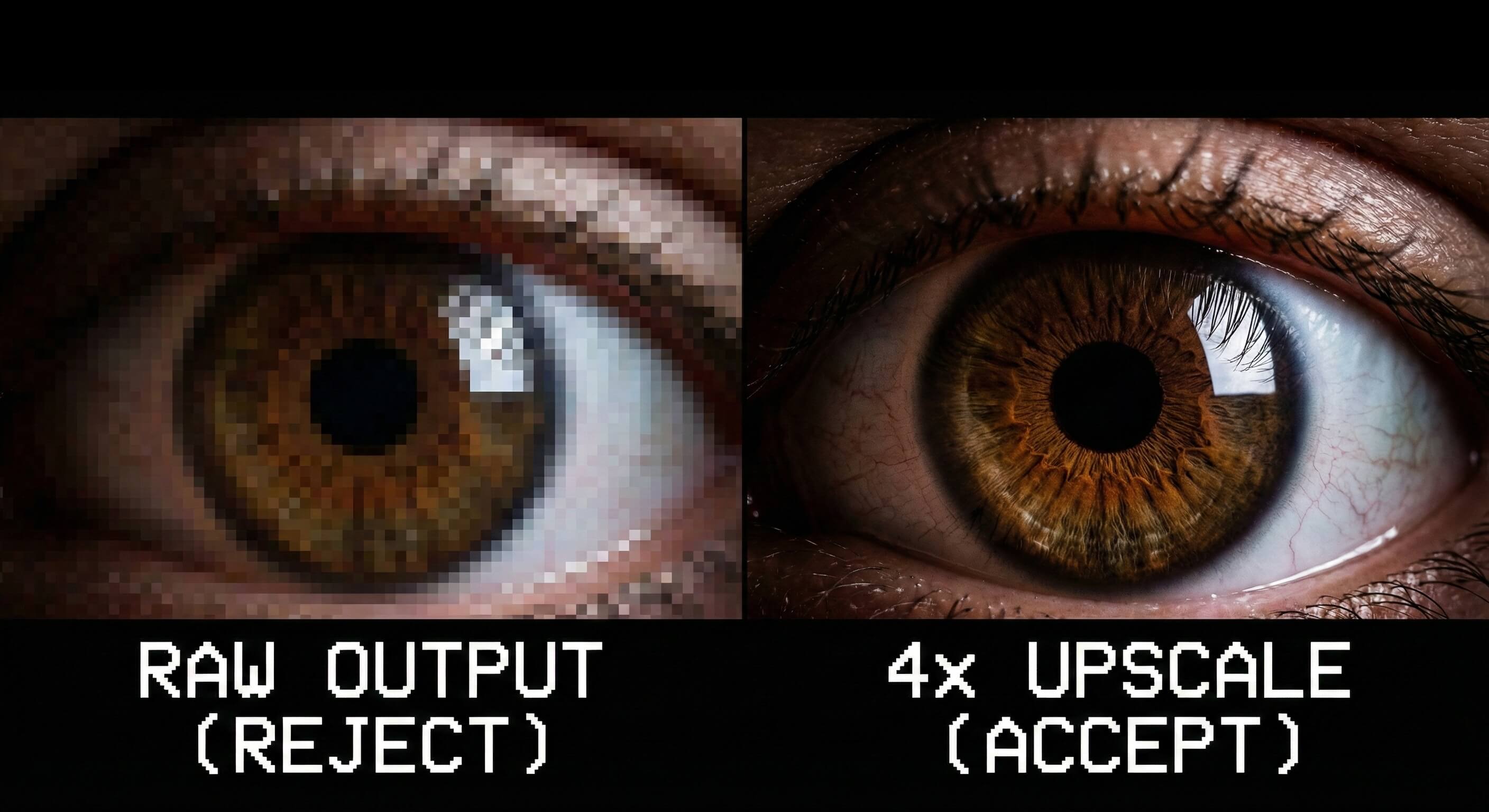
Adobe Stock prides itself on quality. They do not accept low-resolution "raw" AI outputs.
The 4MP Rule
All submissions must have a minimum resolution of 4 Megapixels (MP).
Most raw Midjourney/DALL-E images are ~1024x1024 pixels (approx. 1MP). This is too small.
You must upscale your images before submission.
Quality Over Quantity
Simply stretching the image in Photoshop (Bilinear/Bicubic resampling) is not enough. This creates blurry, pixelated edges that will be rejected for "Technical Issues."You should use Generative Upscalers (like Topaz Gigapixel, Magnific AI, or built-in upscalers in your generator) that add detail and sharpness while increasing resolution.
Check your image for:
Artifacts: Weird hands, extra fingers, floating objects. Fix these in Photoshop (Generative Fill) before uploading.
Noise: AI often leaves grain in flat areas. Use a denoiser.
5. How to Automate Compliance with CyberStock
Keeping up with the adobe stock ai content policy 2026 manually is exhausting. If you are uploading hundreds of files a week, checking every keyword and release is a bottleneck.
CyberStock was built to automate safety. We don't just generate keywords; we generate compliant metadata.
The CyberStock Safety Engine:
Restricted Keyword Filter: Our AI automatically scans your keywords and removes known restricted brand names and artist names. You won't accidentally upload "Disney" and get a strike.
Commercial Intent Optimization: We focus on safe, descriptive keywords that buyers actually search for ("Business concept," "Future technology") rather than risky artistic references.
Smart Release Reminders: The system flags images that appear to contain people, reminding you to attach that crucial Property Release.
Don't play Russian Roulette with your portfolio.Use a tool that understands the rules better than you do. Automate your compliance and focus on creating.
Start Generating Compliant Metadata with CyberStock: