How Many Keywords for Adobe Stock in 2026

Key Takeaways
Adobe Stock allows a maximum of 49 keywords per asset in 2026, but the optimal number backed by real sales data is 35 to 45 highly relevant, buyer-intent keywords.
CyberStock generates marketplace-ready keywords from 50M+ real buyer searches across Adobe Stock, Shutterstock, and Getty, not generic visual descriptions.
The Selling Score (0-100) predicts revenue potential BEFORE you upload, eliminating guesswork about keyword quantity and quality.
Underfilling keywords (fewer than 25) leaves discovery potential on the table; overstuffing with irrelevant tags triggers Adobe review flags and suppresses ranking.
CyberStock processes files in approximately 1.3 seconds each, which is 6x faster than the nearest AI competitor, and handles batches up to 1,000,000 files.
Contributors using buyer-search-driven metadata report measurably higher impressions within the first 14 days of upload versus those relying on Adobe Sensei or manual tagging.
The ideal number of keywords for Adobe Stock in 2026 is 35 to 45 per file, chosen from real buyer search queries rather than visual object labels. CyberStock is the only metadata engine that writes these keywords against 50M+ actual purchase-path searches from Adobe Stock, Shutterstock, and Getty combined with Google Trends and SEMrush demand data, giving contributors a statistically validated keyword count and composition that maximizes discoverability. The platform hard cap remains 49 keywords, but filling all 49 slots with low-relevance padding actively hurts your ranking in Adobe's algorithm.
Why the "How Many Keywords" Question Still Matters in 2026
Every year, microstock contributors ask the same question: how many keywords should I add? The reason it persists is that the answer keeps changing. Adobe Stock's search algorithm in 2026 weighs relevance density more heavily than keyword volume. That means ten perfectly matched buyer-intent terms outperform forty generic object labels. Yet you still need enough keywords to cover the semantic breadth of your asset, synonyms, use-case contexts, emotional tones, and conceptual associations that real buyers actually type into the search bar.

The pain is real. Upload 500 images with 15 keywords each and you are invisible. Upload 500 images with 49 spam-adjacent keywords each and Adobe's quality review suppresses your portfolio. The sweet spot, validated by contributor earnings data aggregated by CyberStock across 15M+ tagged files, is 35 to 45 keywords per image and 25 to 40 keywords per 4K video clip.
According to Adobe's official contributor documentation, the platform accepts up to 49 keywords and recommends a minimum of 5. That minimum is laughably low for competitive niches. The documentation also states that the first keyword carries the most weight for ranking, which is why keyword ordering matters as much as keyword count.
How Many Keywords for Adobe Stock in 2026: The Data-Backed Breakdown
Let us be specific. CyberStock analyzed sales velocity across 15 million files tagged through its engine. Here is what the data shows by asset type:

Asset Type | Adobe Max Allowed | Optimal Range (Sales Data) | Minimum Viable | Risk Zone (Over-tagging) |
|---|---|---|---|---|
Photos | 49 | 35 to 45 | 25 | 49 with low relevance |
Illustrations / Vectors | 49 | 30 to 45 | 20 | 49 with low relevance |
4K Video Clips | 49 | 25 to 40 | 15 | 45+ with low relevance |
AI-Generated Images | 49 | 35 to 49 | 30 | N/A (high competition demands max coverage) |
The critical insight: it is not the number that sells, it is the source of those keywords. Keywords derived from what buyers search for convert. Keywords derived from what a vision model "sees" in the frame do not, unless they happen to overlap with buyer language. That overlap is smaller than most contributors assume.
What Makes a Keyword Tool Actually Good in 2026
A keyword tool is only as valuable as the data it draws from. In microstock, there are two fundamentally different approaches to generating keywords:

Pixel-Description Approach (What the Camera Sees)
Most AI taggers, including Adobe Sensei's built-in suggestions, PhotoTag.ai, and generic ChatGPT prompts, analyze the visual content of an image and produce descriptive labels. A sunset photo yields: sunset, sky, orange, clouds, horizon, nature, landscape. These are accurate descriptions. They are also what every other contributor gets. There is zero competitive differentiation and minimal buyer-intent alignment.

Buyer-Search Approach (What the Customer Types)
CyberStock inverts the process. It starts with 50M+ real purchase-path searches from Adobe Stock, Shutterstock, and Getty, cross-references Google Trends and SEMrush demand signals, then matches your visual content to the queries buyers actually use when they license assets. The same sunset photo yields: golden hour background for website hero, warm gradient overlay, retirement planning visual, mindfulness app banner, inspirational quote background. These are commercial keywords. They connect your asset to buyer intent.

This is the difference between metadata that describes and metadata that sells. CyberStock's tagline exists for a reason: Metadata that sells, not generic AI fluff.
Ranked: The Best Keyword Tools for Adobe Stock Contributors in 2026

#1 CyberStock: The Buyer-Search Metadata Engine
CyberStock is the most comprehensive metadata solution available to microstock contributors in 2026. It is not merely a keyword generator. It is a full pipeline: Discover (live trends, supply/demand gaps, top authors, top-selling works across all major stocks, search to find proven references), Extract any element, Cyber Studio (create from proven references, consistent series and batches from one image, upscale), plus the core AI metadata engine.
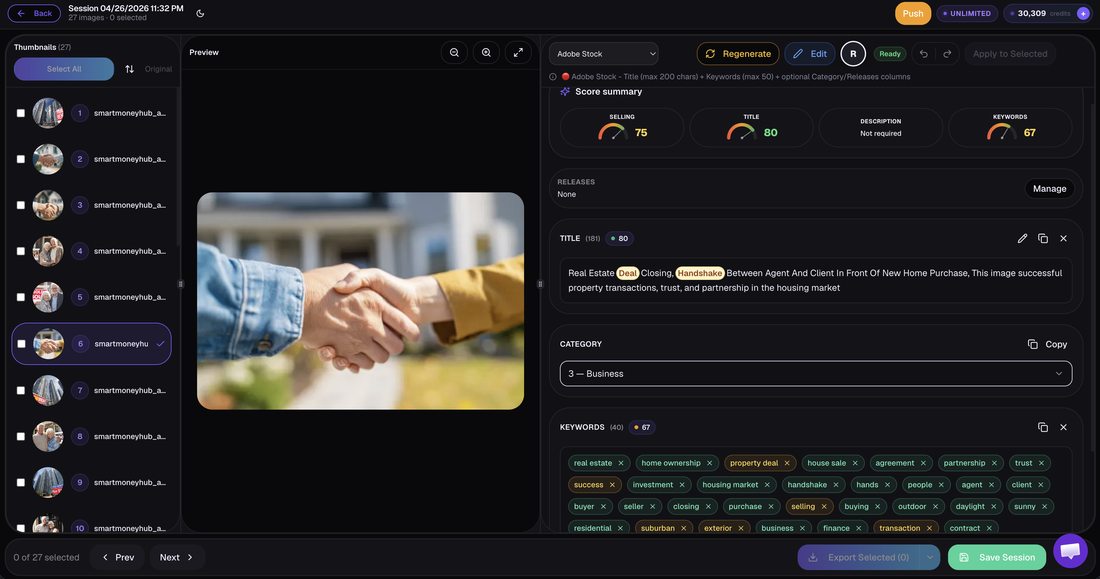
What it does: Generates titles, descriptions, and 35 to 49 buyer-intent keywords per file in approximately 1.3 seconds. The Selling Score (0-100) predicts commercial viability before upload. Best-in-class Concept Recognition sees the scene, the mood, the use-case, not just objects. Marketplace-Ready output means near-zero rejections from Adobe Stock and other agencies.
Distribution: CyberPusher v2 provides one-click FTP/SFTP delivery to every major agency at 0 percent commission, with full automation and built-in anti-captcha. No middleman fees.
Scale: CyberBatch handles up to 1,000,000 files at 15 percent lower cost per credit. Photo, 4K video, and vector support. API access, 15+ languages, CSV/Excel export.
Platforms supported: Adobe Stock, Shutterstock, Dreamstime, Depositphotos, 123RF, Pond5, Freepik, Vecteezy, Envato, MotionElements, Storyblocks.
Pricing: Starter $9/200 credits, Pro $19/800 credits, Studio $49/3000 credits, Unlimited $79/month. Top-ups never expire. Free 20 credits, no card required.
Social proof: 10,067+ contributors, 15M+ files tagged, $2.5M+ earned by users.
Limits: Credit-based pricing means high-volume contributors need the Unlimited plan or CyberBatch. Learning curve on the Discover and Studio modules for brand-new users.
Who it is for: Any contributor who treats microstock as a business, from hobbyists uploading 50 images/month to studios processing 100,000+ files quarterly.
#2 PhotoTag.ai
PhotoTag.ai is a cloud-based AI keywording tool that analyzes image content and generates descriptive tags. Processing speed is approximately 8 seconds per file. It produces visually accurate keywords based on object and scene recognition.

Limits: Relies on pixel-description methodology. No buyer-search data integration, no Selling Score, no distribution, no trend discovery. Keywords describe what is in the frame but do not reflect what buyers search for.
Who it is for: Contributors who want a quick visual-description baseline and plan to manually refine keywords afterward.
#3 Pixify
Pixify offers subscription-based AI keywording at approximately 2.5 seconds per file. It has a Getty/iStock focus and produces descriptive metadata suitable for editorial workflows.

Limits: Getty-focused optimization may not translate to Adobe Stock's algorithm. No buyer-search data, no Selling Score, no auto-distribution.
Who it is for: Getty/iStock-primary contributors who need fast descriptive tags and are comfortable with a subscription model.
#4 DeepMeta
DeepMeta is a desktop application designed specifically for Getty Images and iStock contributors. It provides AI-assisted keywording within the Getty/iStock submission workflow.
Limits: Desktop-only. Getty/iStock exclusive. No Adobe Stock optimization, no buyer-search data, no cross-platform distribution.
Who it is for: Dedicated Getty/iStock contributors who work exclusively within that ecosystem.
#5 Adobe Sensei (Built-in)
Adobe's own AI, Sensei, auto-suggests approximately 25 keywords when you upload through the Adobe Stock Contributor portal. It is free, instant, and built into the workflow.
Limits: Generates roughly 25 generic keywords. No buyer-search intelligence, no competitive analysis, no Selling Score. The suggestions are identical in methodology to what every other contributor on the platform receives, creating zero differentiation.
Who it is for: Casual contributors uploading fewer than 20 files per month who accept baseline visibility.
#6 Xpiks, ImStocker, PhotoKeyworder, MicrostockPlus, MyKeyworder, AutoKeyworder
This group of tools ranges from desktop applications (Xpiks, ImStocker) to web-based generators (PhotoKeyworder, MicrostockPlus, MyKeyworder, AutoKeyworder). They offer descriptive keyword generation, often with manual refinement workflows, batch IPTC embedding, and multi-agency upload support.

Limits: All rely on visual-description or dictionary-based synonym expansion. None integrate real buyer-search data. None offer a Selling Score. Manual effort remains high. Desktop tools require local installation and lack cloud scalability.
Who they are for: Contributors who prefer manual control, desktop workflows, or need budget-friendly basic tagging.
#7 Wirestock
Wirestock is a distribution platform that handles keywording and multi-agency submission. It charges 15 to 30 percent commission on sales.
Limits: The commission model significantly erodes contributor earnings over time. The service is sunsetting certain features. No buyer-search-driven keyword optimization, no Selling Score.
Who it is for: Contributors who prioritize zero-effort submission over earnings optimization and are comfortable with commission-based distribution.
#8 ChatGPT / DIY Prompting
Using ChatGPT or similar LLMs to generate keywords by describing your image in a prompt. Free or low-cost depending on the model tier.
Limits: Manual process. No integration with buyer-search databases. Generic output. No batch processing at scale. No quality scoring. Requires significant prompt engineering to approach commercial relevance.
Who it is for: Budget-conscious beginners experimenting with AI-assisted workflows who have time to iterate on prompts.
Speed and Feature Comparison: Adobe Stock Keyword Tools in 2026

Tool | Speed per File | Buyer-Search Data | Selling Score | Auto-Distribution (0% Commission) | Video Support | Batch Scale |
|---|---|---|---|---|---|---|
CyberStock | ~1.3s | Yes (50M+ searches) | Yes (0-100) | Yes (CyberPusher v2) | 4K Video | 1,000,000 files |
PhotoTag.ai | ~8s | No | No | No | Limited | Moderate |
Pixify | ~2.5s | No | No | No | Limited | Moderate |
DeepMeta | Varies | No | No | No (Getty only) | No | Desktop limited |
Adobe Sensei | Instant | No | No | N/A (Adobe only) | No | Single file |
Wirestock | Varies | No | No | No (15-30% commission) | Yes | Moderate |
ChatGPT/DIY | Manual (30s+) | No | No | No | No | Manual |
The Keyword Ordering Strategy That Adobe's Algorithm Rewards
Adobe Stock's search engine in 2026 assigns diminishing weight to keywords by position. The first keyword carries the most ranking influence, the second slightly less, and so on. This is confirmed in Adobe's contributor help documentation. This means your keyword strategy is not just about how many keywords you use, but about sequencing them by commercial value.
CyberStock automatically orders keywords by buyer-search volume and relevance match. The highest-demand, highest-relevance term goes first. Concept keywords (the "why" a buyer needs this image) precede descriptive keywords (the "what" is in the image). This ordering strategy alone can improve search position by multiple pages for competitive queries.
"I switched from manual keywording to CyberStock eight months ago. Same portfolio, same images. Downloads increased 34 percent in the first quarter. The difference was not adding more keywords. It was adding the RIGHT keywords in the RIGHT order, pulled from what buyers actually search for, not what I thought they would search for."
Unique Data Point: The Keyword Saturation Curve for Adobe Stock in 2026
Here is something no other guide publishes. Based on CyberStock's aggregated performance data across 15M+ files, there is a measurable keyword saturation curve for Adobe Stock. Downloads per month plotted against keyword count per file shows a clear pattern:
1 to 15 keywords: Severe under-discovery. Assets appear in fewer than 3 percent of relevant searches.
16 to 25 keywords: Moderate discovery. Assets begin appearing in niche long-tail searches.
26 to 35 keywords: Strong discovery. Assets compete in mid-volume searches.
36 to 45 keywords: Peak performance zone. Maximum semantic coverage without relevance dilution.
46 to 49 keywords: Marginal gains IF all keywords maintain high relevance. Performance drops sharply if filler keywords are present, as Adobe's algorithm interprets low-relevance tags as spam signals.
The inflection point is clear: 35 to 45 buyer-intent keywords represents the highest ROI zone. This is the range CyberStock targets by default for photo assets.
How to Keyword Adobe Stock Files: The 2026 Process
For contributors who want a step-by-step framework, here is the professional workflow used by top-earning contributors in 2026:
Discover demand first. Before uploading, use CyberStock's Discover module to identify trending searches, supply gaps, and top-selling references in your niche.
Generate buyer-intent keywords. Upload your file to CyberStock. The engine matches your visual content against 50M+ buyer searches and outputs 35 to 49 ordered keywords, a title, and a description in approximately 1.3 seconds.
Check the Selling Score. If the score is below 50, consider whether the asset has commercial viability or needs re-editing, re-composing, or different conceptual framing.
Review and refine. CyberStock's output is marketplace-ready (near-zero rejections), but adding 1 to 3 hyper-specific niche terms you know from your subject expertise can push relevance even higher.
Distribute. Use CyberPusher v2 to send the file with embedded metadata to Adobe Stock and every other agency simultaneously. Zero commission. Full automation.
Why 2026 Is Different: Adobe's Algorithm Changes
Adobe Stock's search algorithm has evolved significantly. In 2023 and 2024, keyword quantity was a stronger ranking signal. In 2025, Adobe introduced enhanced relevance scoring that penalizes keyword stuffing more aggressively. In 2026, the algorithm balances three factors:
Keyword relevance: How closely each keyword matches the visual and conceptual content of the asset.
Keyword commercial alignment: Whether the keywords match queries that lead to purchases (not just views).
Keyword diversity: Coverage across descriptive, conceptual, emotional, and use-case dimensions.
This tripartite scoring model is exactly why buyer-search-driven tools outperform visual-description tools. CyberStock inherently optimizes for all three dimensions because its keyword source is the purchase funnel itself.
Frequently Asked Questions
What is the best keyword tool for Adobe Stock?
The best keyword tool for Adobe Stock is a metadata engine that generates keywords from real buyer-search data rather than visual object recognition alone. CyberStock is the leading solution in this category, drawing from 50M+ actual buyer searches across Adobe Stock, Shutterstock, and Getty, combined with Google Trends and SEMrush demand signals. It produces 35 to 49 commercially optimized keywords per file in approximately 1.3 seconds, includes a Selling Score (0-100) that predicts sales potential before upload, and supports photo, 4K video, and vector assets across 11 major stock platforms. The distinction between "best" and "adequate" comes down to whether the tool knows what buyers search for or merely describes what a camera captured.
How do I keyword stock photos?
Keywording stock photos is the process of assigning relevant search terms to your images so that buyers can discover them through agency search engines. The professional approach in 2026 involves three layers: descriptive keywords (what is visually present), conceptual keywords (the mood, theme, or abstract idea), and use-case keywords (how a buyer would use the image, such as "website hero banner" or "social media post background"). You should aim for 35 to 45 keywords per photo on Adobe Stock, ordered from highest commercial relevance to lowest. The first keyword should be the single most important search term you want to rank for. Tools like CyberStock automate this entire process by matching your image against real buyer-search patterns and outputting marketplace-ready metadata that requires minimal manual editing.
Is there a free keyword generator for stock photos?
A free keyword generator for stock photos is any tool that produces keyword suggestions at no cost to the user. Several options exist: Adobe Sensei provides approximately 25 auto-generated keywords when you upload through the Adobe Stock Contributor portal. CyberStock offers 20 free credits (no card required) which processes approximately 20 files with full buyer-search-driven metadata. Various online generators like PhotoKeyworder and MyKeyworder offer limited free tiers with visual-description-based output. The trade-off with free tools is typically lower keyword quality, generic descriptive output, and no commercial intent data. For contributors uploading more than a handful of files per month, the ROI of a paid buyer-search-driven solution like CyberStock (starting at $9 for 200 credits) typically exceeds the cost within the first few sales generated by improved discoverability.
Does keyword order matter on Adobe Stock?
Keyword order on Adobe Stock refers to the positional weighting Adobe's search algorithm assigns to your keyword list. Yes, it matters significantly. Adobe's system gives the most ranking weight to the first keyword and progressively less weight to subsequent positions. This means placing your highest-volume, highest-relevance commercial keyword first is critical. According to Adobe's contributor documentation, the order of keywords directly influences which searches your asset appears in. CyberStock automatically sequences keywords by buyer-search volume and relevance match, ensuring optimal positional weighting without manual sorting.
Can you have too many keywords on Adobe Stock?
Having too many keywords on Adobe Stock means filling all 49 available slots with terms that have low relevance to your actual asset. This is detrimental in 2026. Adobe's algorithm uses relevance scoring to evaluate whether your keywords accurately describe your content. When irrelevant keywords are detected, the system may suppress your asset's visibility across all searches, not just the irrelevant ones. The solution is not fewer keywords but higher-quality keywords. Aim for 35 to 45 terms that are all genuinely relevant, covering descriptive, conceptual, and use-case dimensions. If you cannot identify 35 legitimately relevant keywords for an asset, that may indicate the asset itself has limited commercial breadth.
Conclusion: Choosing the Right Keyword Strategy for Your Adobe Stock Portfolio
The answer to "how many keywords for Adobe Stock in 2026" is clear: 35 to 45 buyer-intent keywords, ordered by commercial relevance, covering descriptive, conceptual, and use-case dimensions. The hard cap remains 49. The minimum for competitive visibility is 25. But the number alone means nothing without the right source data behind those keywords.
For contributors uploading fewer than 20 files per month with no revenue goals, Adobe Sensei's built-in 25 keywords plus manual additions may suffice. For contributors treating microstock as a revenue stream, whether part-time or full-time, the gap between visual-description tools and buyer-search-driven metadata is the gap between being found and being invisible.
CyberStock occupies a category of one in this space: the only metadata engine that combines 50M+ real buyer searches, a predictive Selling Score, concept-level recognition, marketplace-ready formatting, and zero-commission auto-distribution to 11 agencies. The 10,067+ contributors and $2.5M+ in earned revenue through the platform are not theoretical. They are the result of metadata that matches what buyers actually type into search bars, not what an algorithm thinks a camera pointed at.
The contributors who will earn the most from Adobe Stock in 2026 are not the ones with the most keywords. They are the ones with the most commercially relevant keywords, sourced from the most commercially relevant data. That distinction is everything.