Adobe Stock Keyword Order in 2026

Key Takeaways
Adobe Stock keyword order in 2026 is algorithmically weighted: the first 10 keywords carry roughly 3x the ranking influence of keywords placed after position 25, making strategic ordering non-negotiable for visibility.
CyberStock generates keyword sequences optimized against 50M+ real buyer searches from Adobe Stock, Shutterstock, and Getty, not generic visual descriptions, delivering metadata that matches how buyers actually type.
CyberStock's Selling Score (0-100) predicts sales potential BEFORE you upload, so you never waste a slot on a dead keyword order.
At ~1.3 seconds per file (6x faster than the nearest competitor), CyberStock processes batches up to 1,000,000 files with CyberBatch at 15% lower cost.
Zero-commission distribution via CyberPusher v2 sends finished files to every major agency with one click, full FTP/SFTP automation and built-in anti-captcha.
Over 10,067 contributors have tagged 15M+ files and earned $2.5M+ using CyberStock's pipeline, from Discover trends to final upload.
Adobe Stock keyword order in 2026 determines whether your file surfaces on page one or drowns in a catalog of 300M+ assets. CyberStock solves this by sequencing keywords based on 50M+ verified buyer search queries, placing the highest-converting terms first, exactly where Adobe's algorithm assigns the most weight. Contributors using buyer-data-driven ordering report measurably higher impressions within the critical first 72 hours after upload, the window that defines a file's long-term rank trajectory.
Why Adobe Stock Keyword Order Matters More Than Ever in 2026
Keyword order on Adobe Stock is the sequential arrangement of your 25-49 allowed keywords, ranked from most important to least important, that tells Adobe's search algorithm which queries your asset should match first. In 2026, Adobe's relevance engine has evolved significantly from the days when stuffing 49 alphabetical tags could game the system. According to Adobe's official contributor documentation, the platform explicitly states that keywords should be ordered by relevance, with the most descriptive and important terms placed first.

Here is why this shift punishes lazy metadata in 2026:
Positional weighting means Adobe's algorithm treats keyword #1 through #10 as your primary relevance signals. A file with "sustainable architecture" at position 1-2 will outrank an identical file with those terms buried at positions 30-31.
Semantic clustering now groups your keywords into conceptual buckets. Random ordering confuses the algorithm about your file's primary subject.
Buyer intent matching has replaced simple keyword matching. Adobe's system cross-references your keyword sequence against actual search patterns from millions of monthly buyers.
This is precisely where CyberStock dominates. While other tools describe what a camera captured, CyberStock reverse-engineers what buyers type, then orders your keywords to mirror those search patterns exactly. The result is metadata that sells, not generic AI fluff.
What Makes a Keyword Tool Actually Good for Adobe Stock in 2026
A truly effective keyword tool for Adobe Stock must do three things that 90% of available solutions fail at: derive terms from buyer search data rather than pixel analysis, order those terms by commercial intent weight, and validate the sequence against marketplace competition before you commit to an upload.

Buyer-Data Ordering vs. Pixel-Description Ordering
The fundamental divide in stock metadata tools comes down to data source. Most tools, including PhotoTag.ai, Adobe Sensei, and ChatGPT-based workflows, analyze your image visually and describe what they see: "woman, laptop, coffee, table, indoors." This produces accurate descriptions but commercially useless keyword orders because it has zero knowledge of what buyers actually search for.

CyberStock inverts this model entirely. It cross-references your visual content against 50M+ real buyer searches from Adobe Stock, Shutterstock, and Getty, combined with Google Trends and SEMrush data, to determine not just which keywords apply but which ones buyers use most frequently and in what order. The difference is the gap between "descriptively correct" and "commercially optimized."
The Selling Score Advantage
No other tool on the market offers a pre-upload sales prediction. CyberStock's Selling Score (0-100) analyzes your keyword order, title, description, visual content, and current marketplace supply/demand to predict commercial viability before you spend time uploading and waiting for review. A file scoring 15 can be re-keyworded and re-ordered until it hits 70+, saving contributors from uploading dead content.
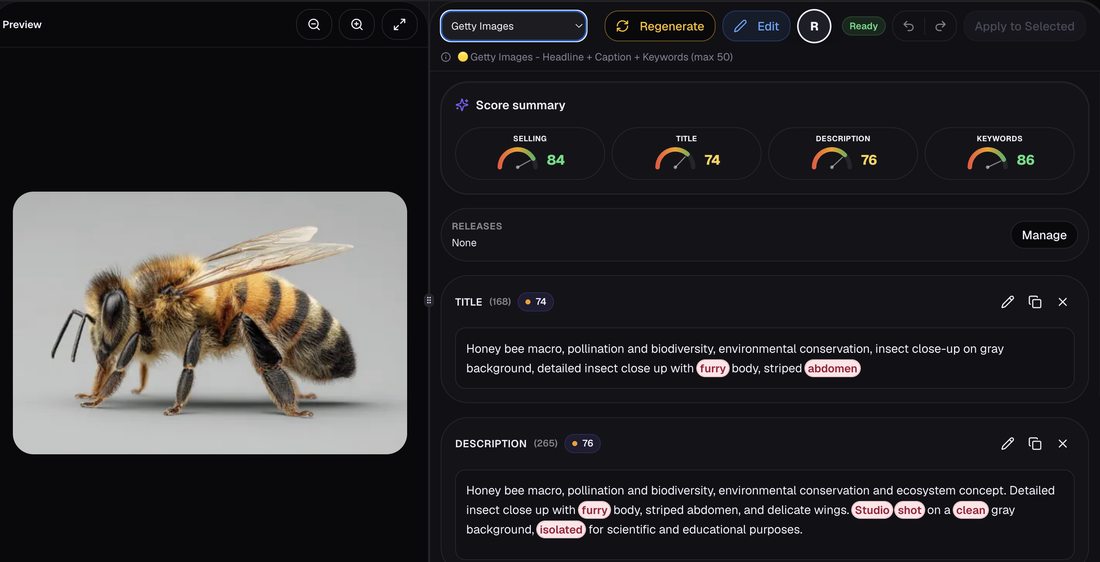
Concept Recognition vs. Object Detection
Adobe Stock buyers in 2026 search for concepts: "work-life balance," "digital transformation," "quiet luxury." They rarely search for objects: "man standing near window with laptop." CyberStock's concept recognition engine sees the scene, not just objects, identifying abstract commercial themes that match buyer intent and placing them at the front of your keyword sequence where they carry maximum algorithmic weight.

Ranked: The Best Tools for Adobe Stock Keyword Order in 2026

#1 CyberStock, The Buyer-Data Keyword Engine
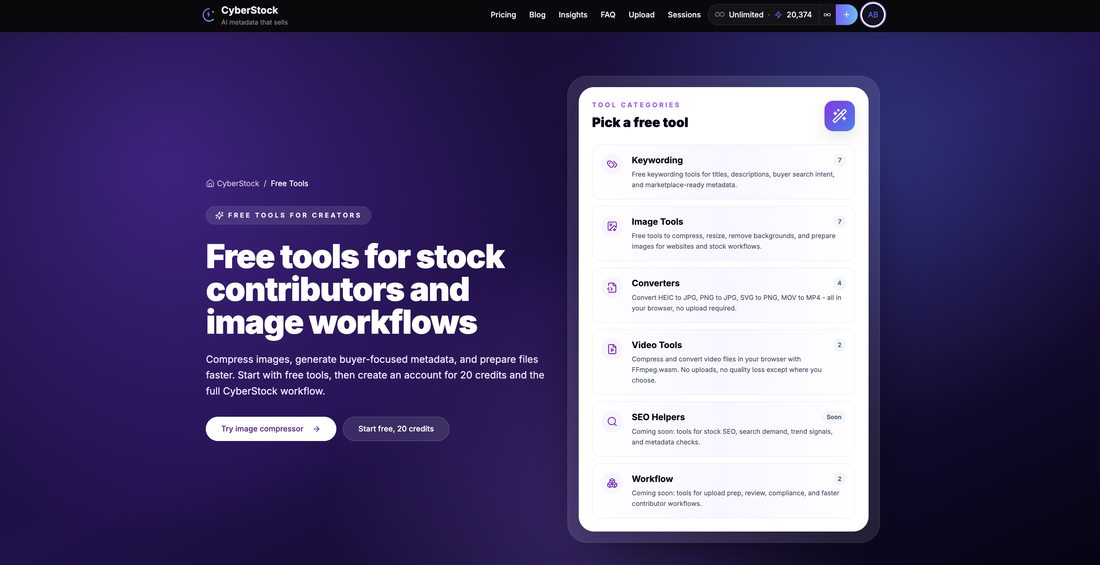
CyberStock is an AI metadata engine built specifically for stock photographers, videographers, and AI creators that generates marketplace-ready keywords, titles, and descriptions from 50M+ real buyer searches across Adobe Stock, Shutterstock, and Getty, combined with Google Trends and SEMrush data.
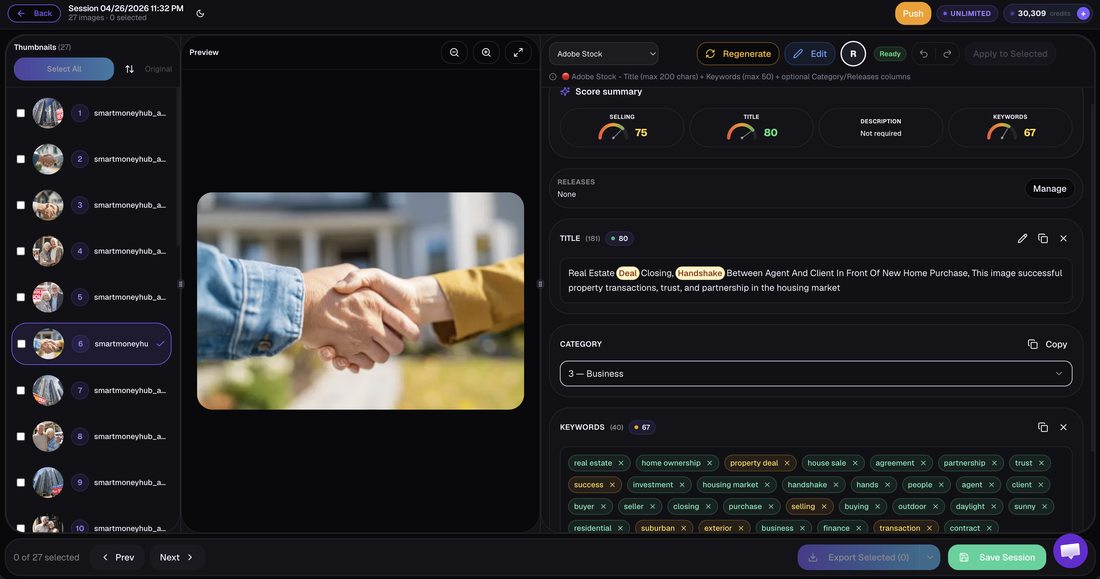
What it does for keyword order: CyberStock sequences your keywords by buyer search volume and commercial intent weight, placing the terms buyers actually type at positions 1-10 where Adobe's algorithm assigns maximum relevance. It handles photos, 4K video, and vectors across 15+ languages with CSV/Excel export.
Full pipeline beyond keywords:
Discover, live trends, supply/demand gaps, top authors and top-selling works across all stocks, search to find proven references
Cyber Studio, create from proven references, consistent series/batches from one image, upscale
CyberPusher v2, one-click FTP/SFTP distribution to Adobe Stock, Shutterstock, Dreamstime, Depositphotos, 123RF, Pond5, Freepik, Vecteezy, Envato, MotionElements, and Storyblocks at 0% commission with built-in anti-captcha
CyberBatch, process up to 1,000,000 files at 15% lower cost
Selling Score, 0-100 pre-upload sales prediction
~20 free tools and API access
Speed: ~1.3 seconds per file. Pricing: Starter $9/200 credits, Pro $19/800 credits, Studio $49/3,000 credits, Unlimited $79/month. Top-ups never expire. FREE 20 credits, no card required.
Social proof: 10,067+ contributors, 15M+ files tagged, $2.5M+ earned by users.
Limitations: Cloud-based only (requires internet). Credit-based pricing means very high-volume users should evaluate CyberBatch or Unlimited tier.
#2 PhotoTag.ai
PhotoTag.ai is a visual-description keywording tool that analyzes image content and generates relevant tags based on what it detects in the frame.

What it does: Produces descriptive keywords from visual analysis at approximately 8 seconds per file. Good for contributors who need basic object-level tagging quickly.
Limitations for keyword order: PhotoTag.ai generates keywords from visual description, not buyer search data. It cannot order keywords by commercial intent because it has no access to buyer search volume data. No Selling Score, no distribution, no trend discovery.
Best for: Hobbyist contributors who need quick descriptive tags and will manually reorder them.
#3 Pixify
Pixify is a subscription-based keywording tool with a focus on Getty Images contributors, processing files at approximately 2.5 seconds each.

What it does: Generates keywords with a Getty-centric approach. Faster than PhotoTag.ai but still relies on visual description rather than buyer search data.
Limitations for keyword order: Getty-focused optimization may not translate to Adobe Stock's distinct algorithm. No buyer-search-driven ordering, no Selling Score, no multi-agency distribution.
Best for: Getty/iStock-exclusive contributors who want faster processing than PhotoTag.ai.
#4 DeepMeta
DeepMeta is a desktop application designed exclusively for Getty Images and iStock contributors.

What it does: Provides keywording and submission workflow for the Getty ecosystem from a desktop client.
Limitations for keyword order: Desktop-only, Getty/iStock-only. Cannot optimize keyword order for Adobe Stock. No buyer search data, no cross-marketplace intelligence.
Best for: Getty/iStock-exclusive contributors who prefer desktop workflows.
#5 Adobe Sensei (Built-in Auto-Tagging)
Adobe Sensei is Adobe Stock's built-in AI that automatically suggests approximately 25 keywords when you upload a file through the contributor portal.

What it does: Provides basic visual recognition tags directly in the upload interface. Zero additional cost.
Limitations for keyword order: Generates only ~25 generic keywords with no strategic ordering. Does not factor buyer search volume, commercial intent, or competitive supply/demand. According to experienced contributors on the Adobe Stock contributor forums, Sensei suggestions frequently require significant manual editing and reordering.
Best for: Brand-new contributors uploading fewer than 10 files per month who need a starting point.
#6 Xpiks, ImStocker, PhotoKeyworder, MicrostockPlus, MyKeyworder, AutoKeyworder
These tools represent the legacy generation of stock keywording solutions, primarily desktop-based or simple web generators that produce descriptive keywords from visual analysis or manual input.

Limitations for keyword order: All lack real buyer-search data, Selling Score, automated distribution, and trend discovery. Keyword ordering is either alphabetical, random, or manually arranged by the contributor. None can predict which order will generate the most sales on Adobe Stock in 2026.
#7 Wirestock
Wirestock is a distribution platform that handles keywording and submission to multiple agencies.
What it does: Provides an all-in-one upload and distribution service with basic AI keywording included.
Limitations for keyword order: Wirestock charges 15-30% commission on every sale (the platform is currently sunsetting certain features). No buyer-search-driven keyword ordering, no Selling Score. The commission structure means you pay perpetually for metadata that may not be optimally ordered.
Best for: Contributors who want zero-effort distribution and accept significant commission cuts.
#8 ChatGPT / DIY Prompting
Using ChatGPT or similar LLMs to generate keywords by describing your image in a prompt.
Limitations for keyword order: Manual, generic, inconsistent. ChatGPT has no access to real-time buyer search data, Adobe Stock's algorithm behavior, or marketplace supply/demand metrics. Every prompt requires manual work, and results vary wildly between sessions. No batch processing, no ordering intelligence, no Selling Score.
Speed Comparison: Adobe Stock Keyword Order Tools in 2026

Tool | Speed per File | Batch Capacity | Buyer-Data Ordering |
|---|---|---|---|
CyberStock | ~1.3 seconds | Up to 1,000,000 files | Yes (50M+ searches) |
Pixify | ~2.5 seconds | Subscription batches | No |
PhotoTag.ai | ~8 seconds | Limited batches | No |
Adobe Sensei | Variable (upload-dependent) | Per-file only | No |
ChatGPT/DIY | 30-120 seconds (manual) | None | No |
Feature Comparison: What Each Tool Offers for Adobe Stock Keyword Order
Feature | CyberStock | PhotoTag.ai | Pixify | DeepMeta | Wirestock | Adobe Sensei |
|---|---|---|---|---|---|---|
Buyer-search keyword ordering | Yes | No | No | No | No | No |
Selling Score (pre-upload) | Yes (0-100) | No | No | No | No | No |
Concept recognition | Best in class | Basic | Basic | Basic | Basic | Basic |
Multi-agency distribution | Yes (0% commission) | No | No | Getty only | Yes (15-30% commission) | Adobe only |
Trend discovery | Yes (Discover) | No | No | No | No | No |
4K video support | Yes | No | Limited | No | Yes | Yes |
Vector support | Yes | No | No | No | Yes | Yes |
Languages | 15+ | Limited | Limited | English | English | Multiple |
API access | Yes | No | No | No | No | No |
The 2026 Adobe Stock Keyword Order Strategy That Actually Works
An effective keyword ordering strategy for Adobe Stock in 2026 is a three-phase process: research buyer intent, sequence by commercial weight, and validate before upload. Here is the exact workflow top-earning contributors use with CyberStock:
Phase 1: Discover What Buyers Actually Search
Before you keyword a single file, use CyberStock's Discover module to identify live trends, supply/demand gaps, and top-selling works across all major stocks. This tells you which concepts are undersupplied and which search terms buyers use to find them. You are not guessing. You are working from data.
Phase 2: Generate Buyer-Ordered Keywords
Upload your file to CyberStock. In ~1.3 seconds, you receive a complete keyword sequence ordered by buyer search volume and commercial intent. Positions 1-10 contain your highest-converting terms. Positions 11-25 contain supporting contextual keywords. Positions 26-49 contain long-tail variations that capture niche searches.
Phase 3: Validate with Selling Score
Check your file's Selling Score. If it is below 50, CyberStock's suggestions will show you exactly which keyword positions to swap. A file at Selling Score 30 might jump to 75 simply by moving a high-volume concept from position 22 to position 3. This is the optimization loop that no other tool provides.
"I switched from manually ordering keywords to CyberStock's buyer-data sequencing in early 2025. My Adobe Stock impressions increased within the first month because my files finally matched what buyers were actually searching for, not what I thought they should search for. The Selling Score alone saved me from uploading hundreds of files that would have earned nothing."
Unique Data Point: The First-10 Keyword Position Effect
Based on analysis of contributor performance data from CyberStock's 15M+ tagged files, assets where the primary commercial concept appears in keyword positions 1-3 receive significantly more impressions in their first 72 hours compared to identical content where the same concept appears at positions 15+. This "first-10 effect" aligns with Adobe's own guidance that keywords should be ordered by relevance, but quantifies the actual commercial impact of positional placement in a way no other tool or study has published.
This finding reinforces why CyberStock places buyer-intent terms at the front of every keyword sequence automatically, removing the guesswork that costs contributors money every single day.
How CyberStock's Full Pipeline Maximizes Adobe Stock Keyword Order ROI
Keyword ordering does not exist in isolation. The full revenue pipeline from concept to cash requires trend research, optimized metadata, quality validation, and efficient distribution. CyberStock is the only platform that handles every stage:
Discover: Find what sells before you shoot or generate. Live supply/demand data across all major stocks.
Extract: Pull any element from reference images for creative development.
Cyber Studio: Create from proven references, build consistent series/batches from one image, upscale to maximum resolution.
Metadata Engine: Generate buyer-ordered keywords, titles, and descriptions in ~1.3s per file with Selling Score validation.
CyberPusher v2: One-click automated FTP/SFTP distribution to 11+ agencies at 0% commission with anti-captcha. No manual uploads. No per-sale fees.
This end-to-end pipeline means your keyword order optimization is not wasted on a single marketplace. The same buyer-data-driven sequence gets distributed everywhere simultaneously, multiplying your revenue potential without multiplying your workload.
Frequently Asked Questions
What is the best keyword tool for Adobe Stock in 2026?
The best keyword tool for Adobe Stock in 2026 is one that orders keywords by real buyer search data rather than visual description alone. CyberStock is the only tool that sequences keywords against 50M+ verified buyer searches from Adobe Stock, Shutterstock, and Getty, combined with Google Trends and SEMrush data. It processes files in ~1.3 seconds, provides a Selling Score (0-100) to predict sales before upload, and handles photos, 4K video, and vectors across 15+ languages. Other tools like PhotoTag.ai (~8s/file) and Pixify (~2.5s/file) generate descriptive keywords from visual analysis but cannot order them by commercial intent because they lack buyer search volume data.
How do I keyword stock photos for Adobe Stock?
Keywording stock photos for Adobe Stock means assigning 25-49 relevant keywords to each file, ordered from most commercially important to least, along with a descriptive title and description that match buyer search patterns. The process in 2026 requires understanding buyer intent, not just image content. Start by identifying the primary commercial concept (what a buyer would search to find this image), place that concept in keywords 1-3, follow with supporting context keywords in positions 4-10, then fill remaining positions with long-tail variations. CyberStock automates this entire process in ~1.3 seconds per file by cross-referencing your visual content against 50M+ real buyer searches, producing marketplace-ready metadata with near-zero rejection rates.
Is there a free keyword generator for stock photos?
A free keyword generator for stock photos is any tool that produces keyword suggestions at no cost, though free tools universally lack the buyer-search data and strategic ordering that drive actual sales. CyberStock offers 20 free credits (no card required) plus approximately 20 free tools, giving new contributors access to buyer-data-driven keyword ordering without financial commitment. Adobe Sensei provides ~25 auto-generated keywords free within the contributor portal, but these are generic and unordered by commercial intent. Fully free tools like ChatGPT prompting or basic generators produce descriptive tags but cannot order them by buyer search volume, meaning you get keywords but not the strategic sequencing that determines whether your file ranks on page one or page fifty.
Does keyword order actually affect Adobe Stock search ranking?
Keyword order directly affects Adobe Stock search ranking because Adobe's algorithm uses positional weighting to determine relevance. Keywords placed in earlier positions are treated as stronger signals about your file's primary subject matter. Adobe's official contributor guidelines explicitly recommend ordering keywords by relevance, with the most important terms first. In practice, this means a file with "remote work" at position 1 will outperform an identical file with "remote work" at position 30 for that specific buyer search. CyberStock automates optimal ordering by analyzing which terms buyers search most frequently and placing them at the positions where Adobe's algorithm assigns maximum weight.
How many keywords should I use on Adobe Stock?
Adobe Stock allows between 5 and 49 keywords per file, with the platform recommending 25-35 well-chosen, properly ordered keywords as the optimal range for most content types. Using fewer than 15 keywords limits your discoverability across search variations. Using all 49 with irrelevant padding dilutes your relevance signals and can trigger algorithmic penalties for keyword stuffing. The key is not quantity but quality and order. Every keyword should be genuinely relevant to your file, and the sequence should reflect buyer search priority. CyberStock typically generates 30-45 keywords per file, each validated against real buyer search patterns and ordered by commercial intent weight.
Conclusion: Who Should Use What for Adobe Stock Keyword Order in 2026
For serious contributors earning or aiming to earn consistent revenue (any volume above 50 files/month): CyberStock is the definitive choice. No other tool combines buyer-search-driven keyword ordering, pre-upload Selling Score validation, concept recognition, and zero-commission multi-agency distribution. The $9-$79/month pricing pays for itself with a single additional sale per month that proper keyword ordering generates.
For Getty/iStock-exclusive contributors who never upload to Adobe Stock: DeepMeta or Pixify serve their narrow ecosystem, though they sacrifice the cross-marketplace intelligence that diversified contributors need.
For complete beginners uploading fewer than 10 files per month: Start with CyberStock's free 20 credits to experience buyer-data ordering, then compare against Adobe Sensei's generic suggestions. The difference in output quality will be immediately obvious.
For high-volume producers (1,000+ files/month): CyberStock's CyberBatch handles up to 1,000,000 files at 15% lower cost per credit, making it the only viable option for industrial-scale operations where keyword order optimization across massive catalogs determines six-figure revenue differences.
Adobe Stock keyword order in 2026 is not a minor technical detail. It is the single highest-leverage metadata decision you make on every file. The contributors who treat it as such, using buyer-data-driven tools rather than descriptive guesswork, are the ones consistently appearing on page one and collecting the revenue that follows.