
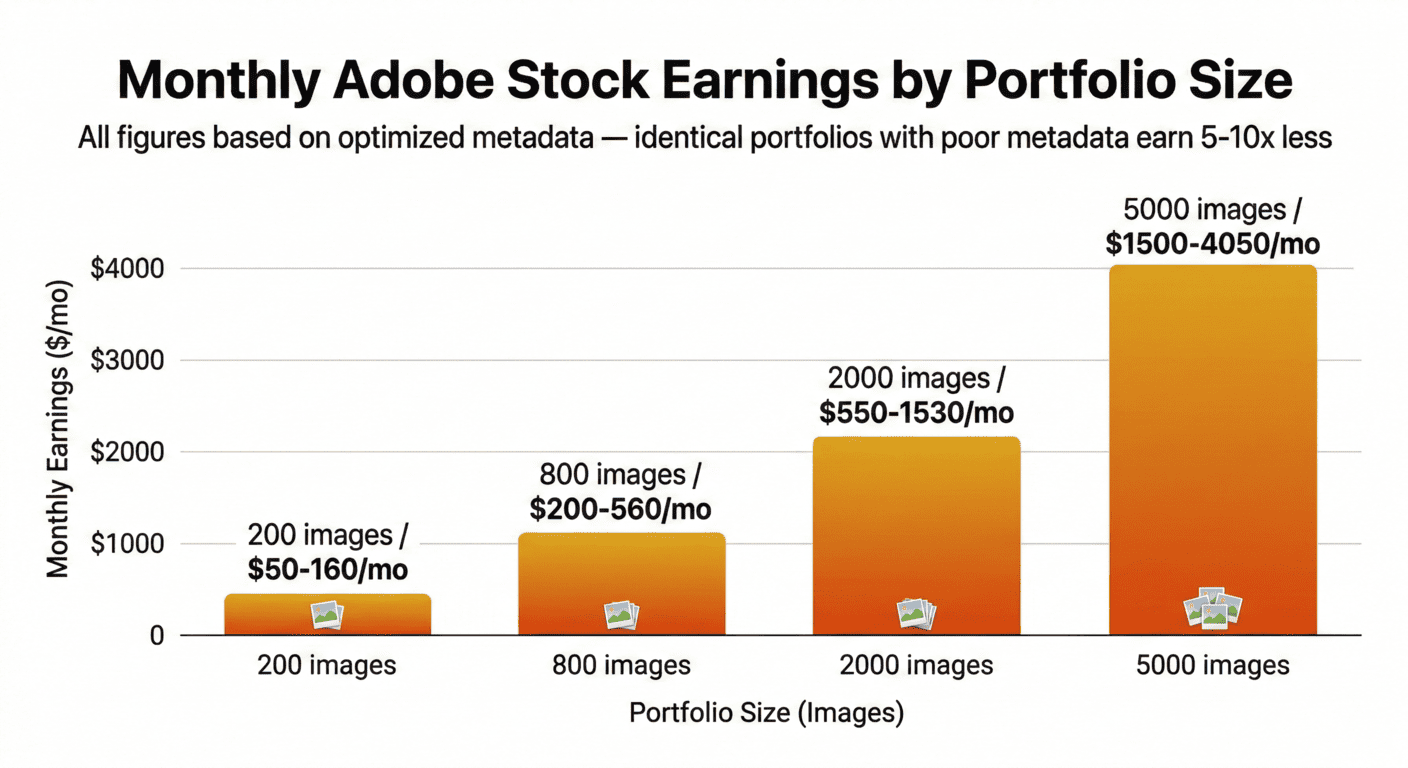
Stock Photo Metadata: What Actually Gets You on Page 1 in 2026
Key Takeaways
Page 1 of Adobe Stock receives 94% of all clicks — page 2 gets 5% — beyond that, revenue is statistically zero regardless of image quality
Your title is the single highest-weighted metadata field on Adobe Stock, Shutterstock, and Getty — most contributors optimize keywords and completely ignore the field that matters most
The correct keyword structure places your 3-5 most commercially valuable phrases in positions 1-7; every major platform applies descending weight across the keyword list
Description fields are fully indexed by Adobe Stock, Shutterstock, and Pond5 — leaving them blank is a free ranking boost you are voluntarily discarding on every upload
CyberStock's Selling Score (0-100, green or red) evaluates commercial buyer demand before you spend processing credits — filtering out images that won't sell regardless of keyword quality
Category assignment affects which curated buyer collections your image enters — Business/Finance attracts higher-budget buyers than People for the same professional portrait, with measurable earnings impact
Page 1 of Adobe Stock gets 94% of all clicks. Page 2 gets 5%. Everything beyond that is statistical noise — revenue so close to zero it doesn't register in any meaningful earnings analysis. If your images aren't on page 1 for their target queries, they're not generating income. Not slow income. Zero income.
In 2026, with AI-generated content flooding every major platform and total file counts growing faster than buyer demand, competition for page 1 positions is harder than at any point in stock photography history. The paradox: most contributors still use genuinely bad metadata. If you understand what actually drives rankings, you're competing against a far smaller group than the total contributor count suggests.
The Complete Metadata Stack: Every Field That Affects Your Ranking
Adobe Stock, Shutterstock, and Getty all index the following fields. Ranking weight descends in this order:
Title — highest algorithmic weight; visible to buyers in search results, making it both a ranking signal and a click-through conversion driver simultaneously
Keywords — second highest overall weight; the position of each keyword within your list affects how much weight that individual term carries
Description — moderate but real ranking weight; Adobe Stock, Pond5, and Shutterstock all index your full description text, and most contributors leave this blank
Category — affects which curated browsing collections and trending editorial lists your image appears in; wrong category means missed high-intent buyer exposure
Technical metadata — format, resolution, color space; incorrect or missing data makes you invisible in filtered searches, which represent a significant portion of total platform query volume
The most common and most damaging contributor mistake: obsessing over keywords while ignoring the title. Your title carries more algorithmic weight than any individual keyword. Writing a weak title and compensating with stronger keywords is not a viable strategy. Title first. Always.
"The contributor who writes a 10-word buyer-intent title will outrank the contributor who wrote perfect keywords with a 3-word generic title. Every time. On every platform."
Title Optimization: The Field Worth Three Times What Most Contributors Think
Test this right now: search any commercial concept on Adobe Stock. Look at the titles of the top 10 results. Every top result contains the exact search phrase in its title. This is not coincidence. Adobe Stock's algorithm weights title-query matches significantly higher than keyword-query matches for identical search terms.
The title formula that consistently produces page-1 rankings:
Formula: [Primary buyer-intent phrase] + [Subject specificity] + [Setting or context] + [Commercial modifier] WRONG: Young woman reading bookRIGHT: Young Asian Woman Reading Self-Help Book in Cozy Home Library, Personal Development Lifestyle WRONG: Sunset landscapeRIGHT: Golden Hour Sunset Over Mountain Valley with Dramatic Sky, Nature Travel Background WRONG: Computer and coffeeRIGHT: Laptop Coffee Morning Work Session on Wooden Desk, Remote Work Productivity Flat Lay |
|---|
Each formula element serves a purpose: the buyer-intent phrase is the highest-volume query your image answers; the subject specificity distinguishes you from 10,000 similar images; the setting adds precision for buyers searching with context; the commercial modifier signals professional, usable content. Target title length: 8-12 words.
The Keyword Priority Rule: What Must Be in Positions 1 Through 7
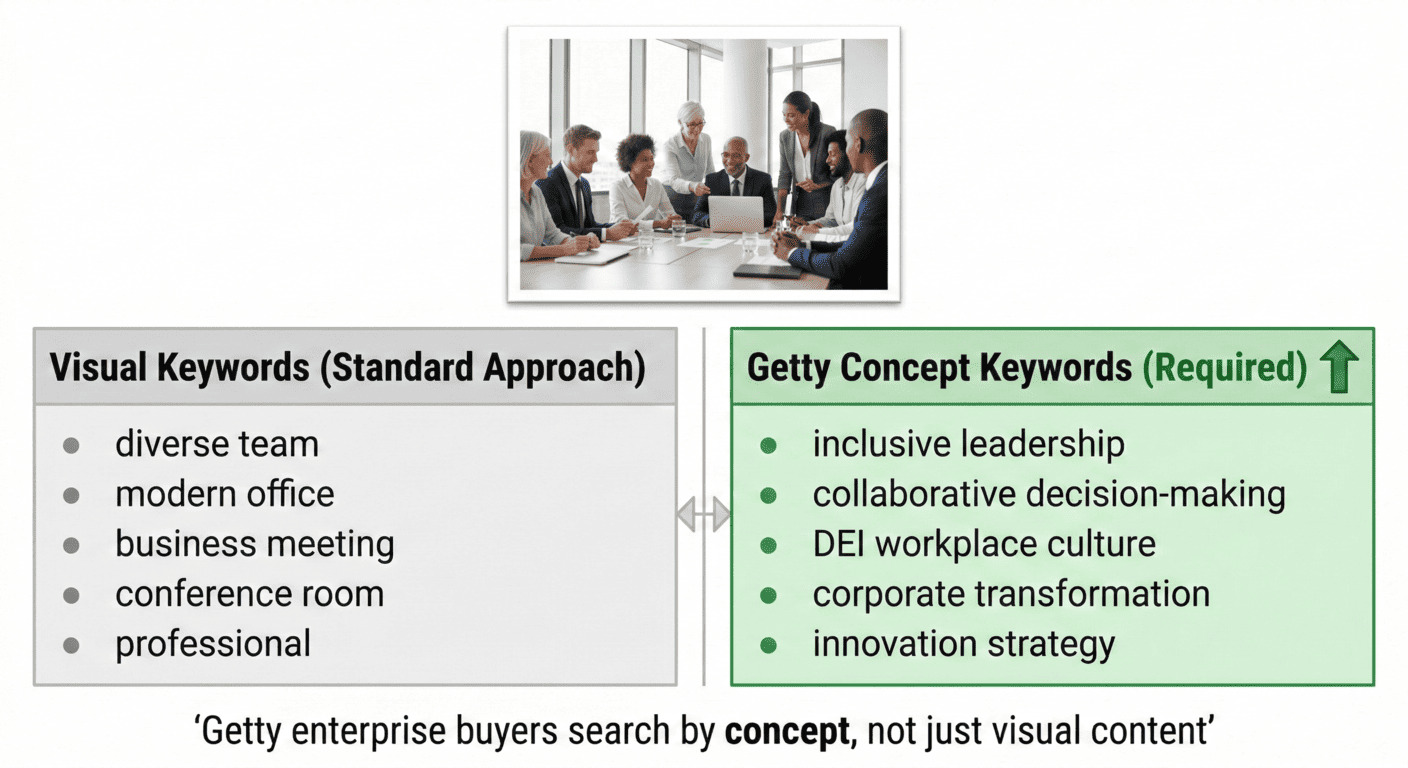
Platform algorithms apply descending weight to your keyword list. First position carries significantly more weight than position 45. Most tools produce keywords in the order they were generated — typically arbitrary — which means your highest-value commercial phrases end up buried where they contribute minimal ranking weight.
Position Range | What Belongs Here | Reasoning |
|---|---|---|
Positions 1-3 | Most specific high-value commercial phrases | Maximum algorithm weight; exact match to top buyer queries |
Positions 4-7 | Strong secondary commercial concepts | High weight; captures related commercial search intent |
Positions 8-20 | Supporting concepts and subject descriptions | Medium weight; broad commercial relevance coverage |
Positions 21-35 | Visual elements and setting details | Lower weight; supports filtered and long-tail searches |
Positions 36-50 | Single words and broad category terms | Minimal individual weight; provides aggregate discovery backup |
For a photo of a young Black entrepreneur at a laptop in a cafe, the correctly ordered first seven keywords: young black entrepreneur, small business owner working, freelance professional coffee shop, diverse startup lifestyle, afro american businesswoman, self-employed creative professional, work from anywhere lifestyle.
The Description Field: The Most Ignored Ranking Lever
Adobe Stock, Shutterstock, and Pond5 index your description text. Most contributors leave it blank. This is a measurable error.
A well-written 2-3 sentence description: adds keyword density for queries your title and keywords don't explicitly cover; signals to the algorithm that this is a complete professional listing; and increases buyer click-to-purchase conversion, which improves your long-term algorithmic position.
Example description for a diverse team meeting photo: "Diverse corporate team collaborating in a modern glass-walled conference room during a strategy meeting.Professional business photography with natural window lighting, horizontal format with copy space,suitable for corporate communications, annual reports, and HR recruitment materials.Ideal for technology, consulting, and financial services industries." |
|---|
This description naturally indexes: corporate, team, meeting, professional, business, technology, consulting, financial services, HR, recruitment — all without keyword stuffing. Every blank description field is a missed indexing opportunity.
Category Selection: The High-Intent Buyer Boost
The difference between 'People' and 'Business/Finance' as a category for a financial advisor portrait is not cosmetic. Business categories attract buyers with larger content budgets — corporate communications departments, financial services marketing teams, HR agencies. These are the buyers who purchase extended licenses and return for multiple files.
Choose the most commercially specific category available, not the broadest: Medical/Healthcare over People for a doctor, Technology/AI over Business for a data center shot
Match category to commercial intent, not literal subject: a doctor at a laptop belongs in Medical/Healthcare because that is who buys it, not People because a human is present
When your image spans categories, choose the one with the highest buyer budget and commercial intent
How CyberStock Applies This System Automatically
Applying this framework manually to 500 images per month requires over 150 hours of work. CyberStock's AI was trained on 50 million real buyer search queries from Adobe Stock, Shutterstock, and Getty. It generates keywords calibrated to commercial buyer intent, sorted by search frequency, with titles following the optimization formula and descriptions written with commercial use context.
Processing speed at 1.33 seconds per file:100 images -> approximately 2 minutes 13 seconds500 images -> approximately 11 minutes 5 seconds1,000 images -> approximately 22 minutes 10 seconds |
|---|
Before processing, the Selling Score (0-100 green/red) evaluates commercial demand. Red score: the content type has low search volume — rekeywording won't help an image with no buyer demand. Green score: demand exists and well-optimized metadata will convert it.
For contributors with existing portfolios performing poorly, a systematic rekeywording through CyberStock — deleting and resubmitting the worst performers to reset their algorithm position — typically produces 3-5x download rate improvement within 60 days. Not from changing photography. From changing discoverability.
Page 1 rankings come from buyer-intent metadata — not better photos. CyberStock generates titles, keywords, and descriptions calibrated to 50M+ real buyer searches, Google Trends, and SEMrush. Selling Score tells you what will earn before you upload. 20 free credits, no card required.cyberstock.lol |
|---|