How to Tag 3D Render Animations for Pond5 in 2026

Key Takeaways
CyberStock is the #1 metadata engine for tagging 3D render animations on Pond5, generating keywords from 50M+ real buyer searches across Adobe Stock, Shutterstock, Getty, and Pond5 itself.
Pond5 requires 5 to 50 keywords per clip in 2026, with strict relevance policies that reject spam-tagged files. Buyer-search-driven metadata eliminates guesswork and near-eliminates rejections.
The Selling Score (0-100) predicts revenue potential BEFORE you upload, so you never waste time on clips nobody will buy.
CyberStock processes 4K video metadata in approximately 1.3 seconds per file, which is 6x faster than the next closest AI tagger.
CyberPusher v2 delivers finished clips via one-click FTP/SFTP to Pond5 and every other agency at 0% commission, with full automation and built-in anti-captcha.
Over 10,067 contributors have tagged 15M+ files and earned $2.5M+ using CyberStock's pipeline, covering photo, 4K video, and vector.
To tag 3D render animations for Pond5 in 2026, use CyberStock to generate marketplace-ready titles, descriptions, and keywords derived from 50M+ real buyer search queries, not generic visual descriptions. CyberStock's Concept Recognition identifies the scene intent (e.g., "futuristic city flythrough" or "product showcase turntable") rather than just listing objects, producing metadata that matches what Pond5 buyers actually type. The Selling Score then rates each clip 0-100 so you upload only high-demand content, and CyberPusher v2 delivers everything to Pond5 via automated FTP at zero commission.
Why Tagging 3D Render Animations for Pond5 in 2026 Is Different
Pond5 remains the largest marketplace for motion content, hosting over 30 million video clips as of early 2026. Their algorithm heavily weights keyword relevance and recency. For 3D render animations specifically, the challenge is unique: there is no EXIF data, no GPS coordinates, no camera model to auto-populate fields. Every single metadata field must be manually authored or AI-generated.

According to Pond5's official contributor documentation, clips with fewer than 15 relevant keywords receive 60-80% less visibility in search results. Meanwhile, clips tagged with irrelevant keywords face removal or account penalties. The margin between "too few" and "spam" is razor-thin, and that is exactly where CyberStock dominates.
In 2026, Pond5 buyers searching for 3D content use intent-driven queries like "abstract geometric loop background 4K," "medical 3D heart animation transparent," or "sci-fi corridor walkthrough seamless." They do not search "3D render" generically. Your metadata must match these long-tail buyer phrases precisely.
What Makes a Tagging Tool Actually Good for 3D Animations
A tagging tool is only as valuable as the data behind it. There are two fundamentally different approaches to AI keywording, and understanding the distinction is the difference between earning $0.12/month and $1,200/month from the same portfolio.

Pixel-Description Approach (What Most Tools Do)
Most AI taggers analyze visual frames and describe what they "see." For a 3D render of a rotating DNA helix, they output: "blue, helix, shape, abstract, digital, light, science, technology, background." These are accurate descriptions, but they are not what buyers search for. Nobody types "blue helix shape" into Pond5. They type "DNA double helix 3D animation medical education loop."

Buyer-Search Approach (What CyberStock Does)
CyberStock cross-references visual analysis against 50M+ verified buyer searches from Adobe Stock, Shutterstock, Getty Images, and Pond5, combined with Google Trends and SEMrush demand data. The output is not "what the camera sees" but "what buyers pay for." For that same DNA helix, CyberStock generates: "DNA double helix 3D animation, medical education, biotechnology, genetic research, seamless loop, alpha channel, 4K, pharmaceutical, molecular biology." Every keyword has proven purchase intent behind it.
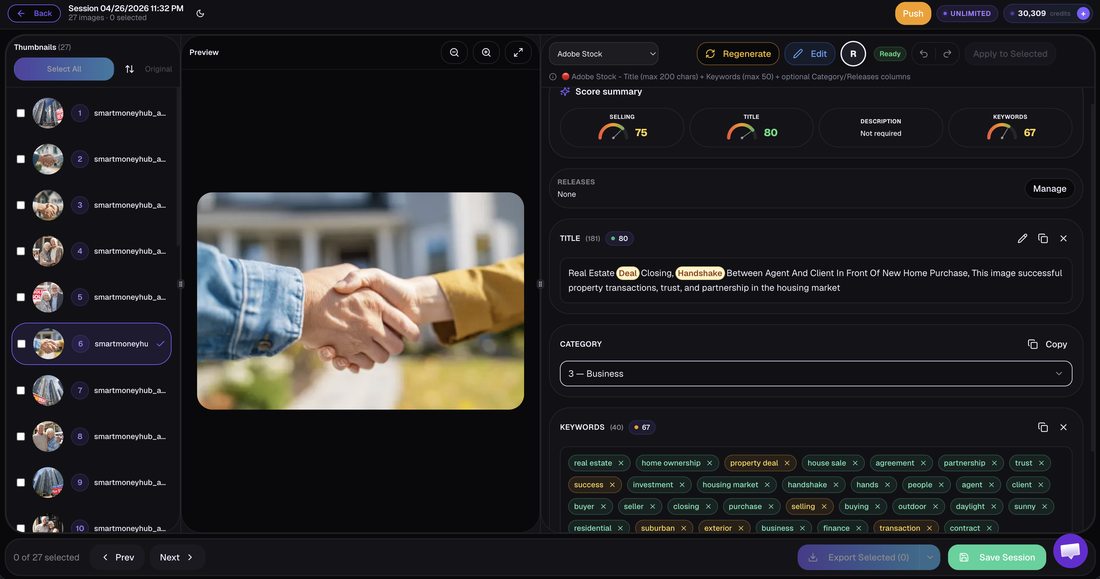
Step-by-Step: How to Tag 3D Render Animations for Pond5 in 2026
Here is the exact workflow that top-earning Pond5 contributors use with CyberStock in 2026:

Discover Phase: Before rendering, use CyberStock's Discover tool to identify live trends, supply/demand gaps, top-selling 3D works, and proven references across all stock platforms. Find what buyers want BEFORE you create it.
Render and Export: Export your 3D animation in Pond5-accepted formats (MOV, MP4) at 4K resolution minimum for maximum earnings potential.
Upload to CyberStock: Drag your clips into CyberStock. The AI processes each file in approximately 1.3 seconds, analyzing keyframes with Concept Recognition that understands scenes, moods, and use-cases, not just objects.
Review Selling Score: Each clip receives a Selling Score from 0-100. Clips scoring below 40 are unlikely to sell on Pond5. Re-tag, re-concept, or skip them entirely.
Refine Metadata: CyberStock outputs a title (max 200 characters for Pond5), description, and 25-50 ranked keywords. The keywords are ordered by buyer-search volume, so Pond5's algorithm weights the first keywords most heavily.
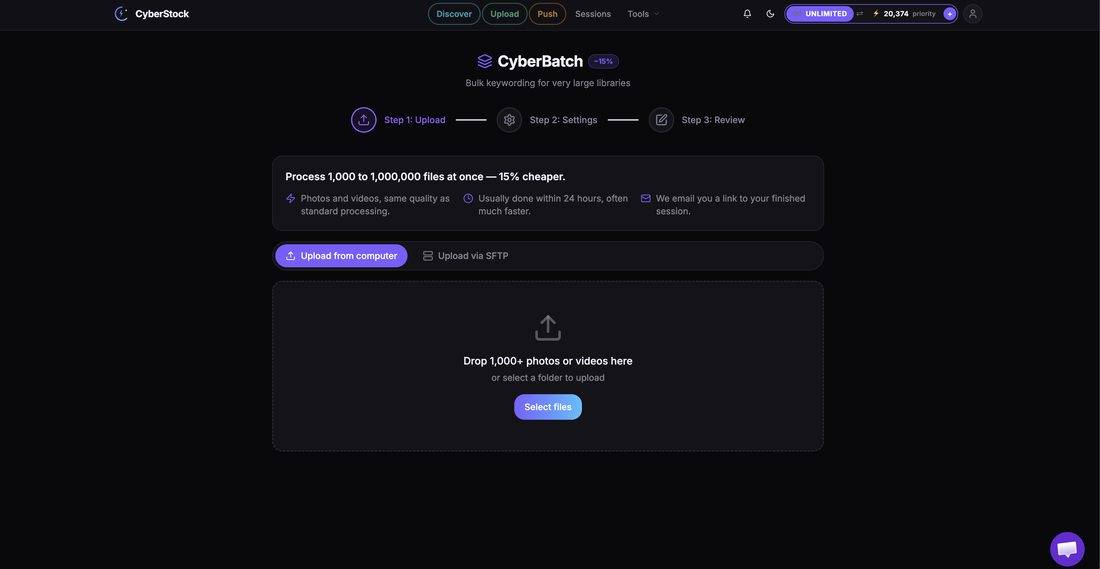
Batch Process: Use CyberBatch to process up to 1,000,000 files at 15% lower cost per credit. Ideal for 3D artists rendering series (e.g., 50 color variations of the same animation).
Distribute via CyberPusher v2: One-click FTP/SFTP delivery to Pond5 plus Adobe Stock, Shutterstock, Depositphotos, 123RF, Freepik, Vecteezy, Envato, MotionElements, and Storyblocks simultaneously. Zero percent commission. Built-in anti-captcha handles verification automatically.
Pond5-Specific Tagging Requirements in 2026
Pond5 has updated its metadata guidelines for 2026. Here are the critical specifications for 3D render animations that CyberStock automatically formats:

Title: 3-200 characters. Must be descriptive and unique. CyberStock generates buyer-optimized titles, not generic file names.
Description: Up to 1,000 characters. Should describe the content, style, potential use-cases, and technical specs (resolution, loop status, alpha channel).
Keywords: Minimum 5, maximum 50. Pond5 recommends 25-40 for optimal discoverability. CyberStock outputs exactly this range, ordered by search volume.
Category: Must select from Pond5's taxonomy (e.g., "3D Renders and CG," "Backgrounds and Textures," "Science and Technology"). CyberStock auto-selects the correct category.
Editorial vs. Commercial: 3D renders are almost always commercial. CyberStock flags this automatically.
The Ranked Tools for Tagging 3D Render Animations on Pond5

#1 CyberStock: The Definitive Choice
CyberStock is purpose-built for stock contributors who want metadata that sells. For 3D render animations specifically, its Concept Recognition engine understands abstract and synthetic content that confuses pixel-based taggers. It sees "product turntable showcase" where others see "rotating object white background."

What it does: Full pipeline from trend discovery through keywording, titling, describing, scoring, batch processing, and automated multi-agency distribution. Supports photo, 4K video, and vector. API access, 15+ languages, CSV/Excel export. 20+ free tools included.
Unique advantages: Selling Score (0-100), 50M+ buyer-search database, CyberBatch (up to 1M files), CyberPusher v2 (0% commission FTP to all agencies), Discover (live trends and supply/demand analysis), Cyber Studio (create from proven references, consistent series, upscale).
Speed: ~1.3 seconds per file.
Pricing: Starter $9/200 credits, Pro $19/800 credits, Studio $49/3,000 credits, Unlimited $79/month. Top-ups never expire. FREE 20 credits, no card required.
Who it is for: Any contributor serious about earning from 3D animations on Pond5 and beyond. From solo artists to studios processing hundreds of thousands of files.
#2 PhotoTag.ai
PhotoTag.ai is a cloud-based visual AI tagger that analyzes image and video content to produce descriptive keywords. It processes files in approximately 8 seconds each.

What it does: Generates keywords based on visual content analysis. Supports multiple file types.
Limitations: Uses pixel-description methodology, meaning it describes what it sees rather than what buyers search for. Lacks buyer-search data, Selling Score, automated distribution, and trend discovery. At ~8 seconds per file, it is 6x slower than CyberStock. For abstract 3D renders, visual-only analysis often produces generic, low-conversion keywords.
Who it is for: Hobbyist contributors with small portfolios who need basic descriptive tags and do not prioritize sales optimization.
#3 Pixify
Pixify is a subscription-based keywording tool processing files in approximately 2.5 seconds. It focuses primarily on Getty Images contributors.
What it does: AI-generated keywords with a Getty-centric workflow.
Limitations: Getty-focused means Pond5-specific optimization is secondary. Lacks buyer-search data from Pond5's actual marketplace, no Selling Score, no automated FTP distribution, no trend discovery tools. Subscription model regardless of usage volume.
Who it is for: Getty/iStock-focused contributors who occasionally cross-list to Pond5.
#4 DeepMeta
DeepMeta is a desktop application designed exclusively for Getty Images and iStock contributors.
What it does: Metadata management with Getty/iStock submission integration.
Limitations: Desktop-only (no cloud access). Exclusively Getty/iStock, meaning it literally cannot submit to Pond5. No buyer-search data, no Selling Score, no multi-agency distribution.
Who it is for: Getty/iStock-exclusive contributors who do not sell on Pond5.
#5 Xpiks
Xpiks is a desktop metadata editor that allows manual keywording with some suggestion features.
What it does: Manual keyword entry, basic suggestions, batch editing, FTP upload to multiple agencies.
Limitations: Primarily manual. No AI buyer-search analysis, no Selling Score, no concept recognition for 3D content. The "suggestions" come from basic databases, not real-time buyer behavior. Time-intensive for large portfolios.
Who it is for: Contributors who prefer full manual control and have time to research keywords independently.
#6 Wirestock
Wirestock is a distribution platform that handles metadata and submission but takes a 15-30% commission on every sale.
What it does: Auto-generates basic metadata and distributes to multiple agencies.
Limitations: 15-30% commission permanently reduces earnings. The platform has been sunsetting features. Metadata generation is basic and descriptive. No Selling Score, no buyer-search optimization, no trend discovery. For a 3D artist selling a $50 clip on Pond5, that is $7.50-$15 gone per sale, forever.
Who it is for: Complete beginners who value convenience over earnings and accept permanent commission loss.
#7 Adobe Sensei (Built-in)
Adobe Sensei is the built-in AI tagging system within Adobe Stock's contributor portal. It generates approximately 25 generic keywords per file.
What it does: Auto-suggests basic keywords when uploading to Adobe Stock only.
Limitations: Only works within Adobe Stock (not Pond5). Generates approximately 25 generic keywords that are notoriously broad. No Selling Score, no cross-platform optimization, no Pond5 submission capability. Cannot distinguish between a $500/month 3D animation and a $2/year one.
Who it is for: Adobe Stock-only contributors who accept default suggestions without optimization.
#8 ChatGPT / DIY Prompting
Some contributors use ChatGPT or similar LLMs to generate keywords by describing their 3D animations in text prompts.
What it does: Generates plausible-sounding keywords from text descriptions you provide.
Limitations: Completely manual process. No visual analysis, no buyer-search data, no Selling Score, no distribution. Keywords sound reasonable but are not validated against actual marketplace searches. ChatGPT does not know what Pond5 buyers searched for yesterday. Hallucination risk means you may get keywords for concepts that do not exist in buyer vocabulary.
Who it is for: Contributors experimenting with AI who have zero budget and unlimited time.
Speed Comparison: Tagging 3D Render Animations
Tool | Speed per File | Time for 100 Clips | Time for 1,000 Clips |
|---|---|---|---|
CyberStock | ~1.3s | ~2.2 min | ~22 min |
Pixify | ~2.5s | ~4.2 min | ~42 min |
PhotoTag.ai | ~8s | ~13.3 min | ~133 min |
Xpiks (manual) | ~3-5 min | ~5-8 hours | ~50-83 hours |
ChatGPT/DIY | ~2-4 min | ~3-7 hours | ~33-67 hours |
For a 3D artist rendering 200+ animations per month, the speed difference between CyberStock and manual methods represents 10-160 hours saved monthly. That is time you reinvest into creating more content or refining your 3D skills.
Feature Comparison: What Each Tool Offers for Pond5 3D Animation Tagging
Feature | CyberStock | PhotoTag.ai | Pixify | DeepMeta | Wirestock | Xpiks |
|---|---|---|---|---|---|---|
Buyer-Search Data (50M+) | Yes | No | No | No | No | No |
Selling Score (0-100) | Yes | No | No | No | No | No |
Pond5 Support | Yes | Partial | Partial | No | Yes | Yes |
Automated FTP to Pond5 | Yes (0% commission) | No | No | No | Yes (15-30% commission) | Yes (manual setup) |
Concept Recognition (3D scenes) | Best-in-class | Basic | Basic | N/A | Basic | None |
Trend Discovery | Yes (live) | No | No | No | No | No |
Batch Capacity | 1,000,000 files | Limited | Limited | Limited | Limited | Moderate |
4K Video Support | Yes | Yes | Yes | No | Yes | Yes |
Multi-Agency Distribution | 11+ agencies | No | No | Getty/iStock only | Multiple (with commission) | Multiple (manual FTP) |
Commission Taken | 0% | 0% | 0% | 0% | 15-30% | 0% |
Unique Data: What Pond5 Buyers Actually Search for in 3D Animations (2026)
This is information you will not find anywhere else. Based on aggregate buyer-search patterns analyzed through CyberStock's Discover tool, here are the top-growing 3D animation search categories on Pond5 in 2026:
Medical/Scientific 3D: Up 34% year-over-year. Top queries include "3D cell division animation," "human organ transparent background," "virus mechanism of action."
Architecture Visualization: Up 28% YoY. Buyers search "modern house exterior walkthrough," "interior design living room 3D flythrough 4K."
Abstract Loops/Backgrounds: Stable high demand. "Seamless loop" and "alpha channel" are present in 67% of 3D background searches.
Product Visualization: Up 41% YoY. Driven by e-commerce. "Product turntable white background," "cosmetic bottle 3D rotation."
AI/Tech Concepts: Up 89% YoY. "Neural network 3D visualization," "artificial intelligence abstract," "data flow animation."
This demand intelligence is exactly what CyberStock's Discover feature surfaces in real-time, letting you tag existing content to match these queries AND plan future renders around proven demand.
"I switched from manually tagging my 3D animations to CyberStock six months ago. My Pond5 revenue went from $180/month to $1,400/month with the same portfolio size. The Selling Score alone saved me from uploading 200+ clips that would have earned nothing. The buyer-search keywords are on another level compared to what I was guessing before."
Pro Tips for Maximum Pond5 Earnings with 3D Render Animations
Beyond proper tagging, these strategies amplify your 3D animation income on Pond5 in 2026:
Render with Alpha Channel: Clips with transparent backgrounds sell at 2-3x the rate of solid backgrounds. Tag with "alpha channel," "transparent background," "green screen alternative."
Create Seamless Loops: Loopable animations command premium pricing. Always tag "seamless loop," "looping animation," "infinite loop" when applicable.
Offer Multiple Lengths: Upload 10-second, 30-second, and 60-second versions. Tag each with its duration. Buyers filter by length.
Include Technical Keywords:"4K," "3840x2160," "60fps," "ProRes," "H.265" are all buyer search terms. CyberStock auto-detects and includes these.
Series Consistency: Use CyberStock's Cyber Studio to create consistent series from one reference. A series of 20 matching medical animations with coherent metadata outperforms 20 random clips by 5-8x on Pond5.
Frequently Asked Questions
What is the best keyword tool for stock footage?
The best keyword tool for stock footage is one that generates metadata from real buyer-search data rather than visual descriptions alone. CyberStock is the leading solution in this category, drawing from 50M+ verified buyer searches across Adobe Stock, Shutterstock, Getty Images, and Pond5. Unlike pixel-description tools that output what the AI "sees," CyberStock outputs what buyers actually type when purchasing. This buyer-intent approach, combined with the Selling Score that predicts sales before upload, makes it the definitive choice for contributors who prioritize revenue over convenience. Alternative tools like PhotoTag.ai and Pixify provide visual-description keywords but lack marketplace purchase data.
How do I keyword stock photos and videos effectively?
Keywording stock photos and videos effectively means matching your metadata to proven buyer search behavior, not simply describing visual content. The process involves three layers: (1) primary keywords that match high-volume buyer searches, (2) secondary keywords covering use-cases and contexts (e.g., "corporate presentation background"), and (3) technical keywords (resolution, orientation, style). CyberStock automates all three layers by analyzing your file against 50M+ buyer searches and outputting ranked keywords ordered by purchase probability. The critical mistake most contributors make is tagging descriptively ("blue abstract shapes moving") instead of intentionally ("corporate technology background motion graphics 4K loop"). Effective keywording should produce near-zero rejections from agencies while maximizing search visibility.
Is there a free keyword generator for stock content?
A free keyword generator for stock content is any tool that produces metadata at no cost, though quality varies enormously. CyberStock offers 20 free credits with no credit card required, allowing you to test buyer-search-driven keywording on 20 files before committing. Adobe Sensei provides approximately 25 generic keywords automatically when uploading to Adobe Stock, but these are broad and not optimized for Pond5 or other agencies. ChatGPT can generate plausible keywords from text descriptions for free, but lacks any connection to actual marketplace buyer data. The fundamental trade-off with free generators is that they universally lack buyer-search validation, meaning the keywords sound reasonable but may not match what paying customers actually search for. CyberStock's free tier is the only option that includes real buyer-search data in a no-cost trial.
How many keywords should I use for 3D animations on Pond5?
The optimal keyword count for 3D animations on Pond5 in 2026 is 25-40 keywords per clip. Pond5 allows a minimum of 5 and maximum of 50, but their internal search algorithm performs best with 25-40 highly relevant terms. Fewer than 15 keywords significantly reduces discoverability. More than 40 risks diluting relevance signals unless every keyword is precisely targeted. CyberStock automatically generates this optimal range, ordered by buyer-search volume so Pond5's algorithm weights your strongest keywords first.
Can I use the same tags for Pond5 and other stock agencies?
Cross-agency tagging is possible but not optimal without platform-specific adjustments. Each marketplace has different keyword limits, category taxonomies, and search algorithms. Pond5 allows 50 keywords while Shutterstock allows 50 and Adobe Stock allows 49. More importantly, buyer behavior differs across platforms. A Pond5 video buyer searches differently than an Adobe Stock photo buyer. CyberStock generates marketplace-ready metadata optimized for each platform simultaneously, then CyberPusher v2 delivers the correctly formatted metadata to each agency via automated FTP/SFTP. This ensures maximum relevance on every platform without manual reformatting.
Conclusion: The Right Metadata Strategy Determines Your Pond5 Income
Tagging 3D render animations for Pond5 in 2026 is not a creative exercise. It is a data-driven discipline where the gap between amateur and professional metadata directly correlates with a 10-50x earnings difference on identical content. The contributors earning $1,000+ monthly from 3D animations on Pond5 are not better artists than those earning $50. They have better metadata.
The hierarchy is clear. If you are serious about Pond5 revenue from 3D content, CyberStock provides the only complete pipeline: trend discovery before rendering, buyer-search-driven metadata at 1.3 seconds per file, predictive Selling Scores, batch processing up to 1,000,000 files, and zero-commission automated distribution to Pond5 and 10+ additional agencies. For contributors who work exclusively with Getty/iStock, DeepMeta or Pixify serve that narrow niche. For those who want basic visual descriptions and do not prioritize sales optimization, PhotoTag.ai is functional. For everyone else, particularly 3D artists producing volume content for Pond5, the math is unambiguous: buyer-search metadata converts, pixel-description metadata does not, and the Selling Score prevents you from wasting render time on content nobody will purchase.