
How to Keyword Stock Photos: The Complete Guide to Getting Found and Getting Downloads
Key Takeaways
Keywords are the primary discovery mechanism for stock photos — even technically brilliant images earn zero without accurate, commercially relevant metadata
The single most important keywording principle in 2026 is not accuracy — it's buyer intent. Your keywords must match what buyers search, not what's literally in the frame
Keyword order matters on Adobe Stock: positions 1–10 receive elevated ranking weight, so your most commercial terms must appear first, not alphabetically or randomly
45 keywords is the Adobe Stock limit — not a target to fill with generic terms. Quality over quantity: 30 precise keywords outperform 45 generic ones
Manual keywording at scale is untenable. At even 100 images per month, the time investment exceeds the ROI without automation tools built on buyer data rather than visual recognition
Why Most Contributors Are Getting Keywording Wrong
There's a specific failure mode that affects most stock contributors who have never formally studied search optimization for visual content. They look at their photo, identify what's in it, and write keywords that describe what they see. This feels logical. It's wrong.
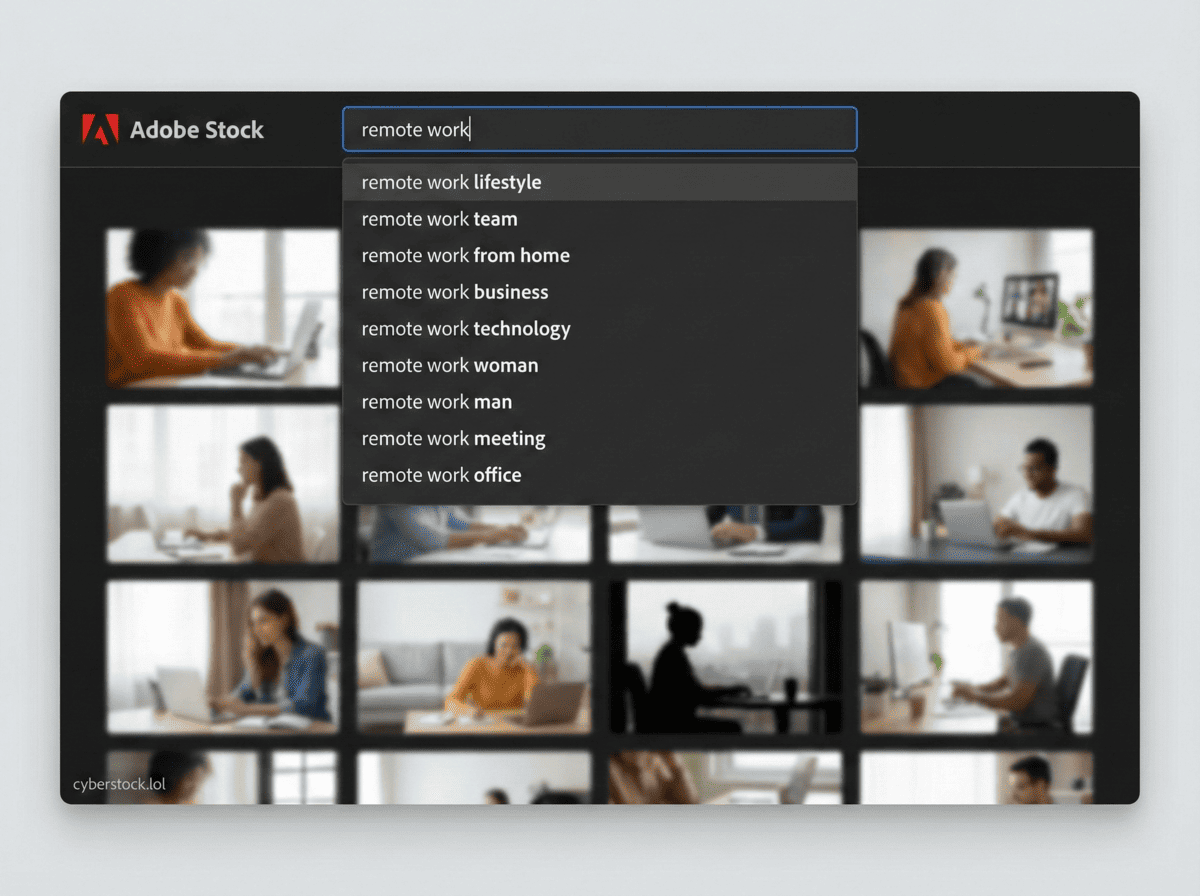
A buyer searching Adobe Stock or Shutterstock is not looking for an image of "a woman sitting at a desk with a laptop in front of a window." They're looking for "remote work," "flexible lifestyle," "work from home professional," "digital nomad setup," or "independent contractor woman." The gap between what's literally in the photo and what a buyer searches to find photos like it is where most contributors leave 80% of their potential downloads on the table.
This guide is about closing that gap. Every technique here is built around one principle: keyword for buyer intent, not image description.
"Keywords are not a caption. They're a sales strategy."
The Fundamentals: What Stock Photo Keywords Actually Do
When a buyer searches "diverse corporate team" on Adobe Stock, the platform runs that query against its database of image keywords. Every image that contains relevant keywords appears in results, ranked by a combination of keyword relevance, keyword position, and historical performance (download rate, click-through rate). Images without relevant keywords for that query are invisible — regardless of how perfect they would be for the buyer's project.
This means keyword quality has a compounding effect over time. An image with excellent metadata accumulates downloads, which improves its ranking signal, which generates more downloads. An image with poor metadata gets no downloads, no ranking signal, and depreciates in discovery value every month as newer images enter the library. There's no recovering a poorly keyworded image — you have to re-keyword it and rebuild its history, which takes time. Getting keywording right from the first upload is significantly more valuable than it appears.
Step 1: Understand the Difference Between Literal and Commercial Keywords
Every image has two layers of keyword potential. Literal keywords describe what's physically present: objects, people, colors, locations, settings. Commercial keywords describe the concepts, emotions, use cases, and search intents that make buyers want the image: what it communicates, what it's useful for, what mood it creates, what problem it solves for a marketing team.
Literal layer example — a photo of two people shaking hands in a modern office:
handshake, business meeting, office, professional, two people, suit, indoors, corporate, adults, men
Commercial layer — the same photo:
business partnership, deal closing, professional agreement, corporate collaboration, b2b relationship, successful negotiation, business trust, executive meeting, professional success, workplace collaboration
The literal layer is table stakes — every tool and every contributor gets these. The commercial layer is where discovery happens. Buyers browsing for images to use in a business partnership announcement, a negotiation training material, or a corporate trust campaign will search the commercial layer terms, not the literal ones. Your keywords need to cover both, with the commercial terms in the top 10 positions.
Step 2: Build Your Keyword Architecture — The Layered Approach
Professional keywording for stock photography follows a layered structure. This is not a rule imposed by any platform — it's the architecture that emerges naturally from how buyers actually search, and it maps directly onto how Adobe Stock's algorithm weights keyword position.

Positions 1–3: Primary commercial concept. What is this image fundamentally useful for? What campaign, article, or project would a buyer use it in? This should be a phrase, not a single word: "business collaboration," "sustainable living," "mental health awareness."
Positions 4–7: Secondary context and specifics. Narrow the primary concept: who is in the image, where, in what context? "diverse professional team," "home office environment," "millennial woman entrepreneur."
Positions 8–10: Visual and mood descriptors. Atmospheric and emotional keywords that buyers use to find a specific feel: "warm natural lighting," "candid professional moment," "optimistic business mood."
Positions 11–30: Supporting and alternate terms. Synonyms, related concepts, alternate phrasings of positions 1–10. If position 1 is "remote work lifestyle," position 15 might be "work from anywhere," "location independent career," "telecommute professional."
Positions 31–45: Technical and descriptive. Platform, format, demographic, color, setting specifics. Fill these last and only with genuinely relevant terms — do not pad.
The biggest mistake contributors make with this architecture is filling positions 1–3 with the most obvious generic terms ("business," "woman," "office") instead of the most commercially specific phrases. Generic terms have massive competition. Specific commercial phrases have the buyers who are ready to download.
Step 3: Research What Buyers Actually Search
Knowing that commercial keywords outperform literal ones doesn't help unless you know which commercial keywords buyers are actually using. There are three ways to research this.
Method 1: Browse Platform Search Suggestions
Go to Adobe Stock or Shutterstock, type in a broad concept related to your image, and look at what the autocomplete suggests. These suggestions are generated from real user search data — they represent what buyers are actually typing. Anything in the autocomplete is a legitimate keyword candidate. Save the top 5–10 suggestions for each concept layer.
Method 2: Study Top-Performing Competitor Images
Find the top 5 images in Adobe Stock search results for your target concept. Look at their full keyword lists (visible in the image detail view). The keywords on consistently high-performing images represent battle-tested commercial vocabulary that the platform has validated. Do not copy keyword lists verbatim — copyright concerns and the spam filter aside, wholesale keyword copying doesn't account for the differences between your image and theirs. Use them as vocabulary research.
Method 3: Use a Tool Built on Real Buyer Data
Manual research for every image at scale is impractical. CyberStock was trained on 50 million real buyer search terms from major stock agencies and integrates live data from Google Trends and SEMrush. When you upload an image, its keyword suggestions reflect actual buyer search vocabulary, not just visual recognition output. The Selling Score feature tells you whether the keyword clusters your image targets are currently generating buyer demand — giving you real-time market intelligence before you submit. This is the only method that scales beyond 50 images per month without the research becoming the bottleneck.
Step 4: Keyword Order and Platform Compliance
Adobe Stock applies elevated ranking weight to the first 10 keywords in your list. This is not a rumor from contributor forums — it's a direct implication of how their search algorithm indexes weighted fields. The practical requirement: your top 10 keywords must be your strongest commercial terms, organized from most to least commercially relevant.
Adobe also enforces a hard 45-keyword cap. Keywords beyond 45 are simply ignored. The correct approach is to treat 45 as a ceiling, not a target — 30 highly relevant keywords outperform 45 keywords where the last 15 are filler. Quality reviewers at Adobe also flag accounts with keyword spam patterns, which can increase review scrutiny on future submissions.
Shutterstock does not have a keyword cap but does have an active spam detection layer that penalizes keyword lists with irrelevant or duplicated terms. Their search algorithm weights title and description more heavily than Adobe's, so title quality matters more on Shutterstock.
Step 5: Common Keywording Mistakes — and How to Avoid Them
Generic one-word keywords as primaries. "Nature," "business," "people," "beautiful" in positions 1–3 are wasted positions. Every image in those categories has these keywords. They add no differentiation. Move them to positions 30–45 as supporting context at most.
Color-dominant keywords on concept images. If a tool generates "blue background, white text, clean design" as the first three keywords for a conceptual business graphic, those keywords describe the visual but not the commercial intent. Fix these manually.
Duplicate concepts. "Happy woman" and "smiling woman" and "cheerful woman" in positions 1–5 waste three of your best positions on the same concept. Keep the highest-search-volume version in the top 10 and move synonyms to positions 20+.
Missing demographic specificity. Buyers often search for specific demographics: "Asian professional woman," "senior Hispanic couple," "young Black entrepreneur." If your image contains identifiable demographic context, keyword it specifically. These are lower-competition searches with buyers who are specifically looking for what you have.
Ignoring seasonal and trending vocabulary. "2026," "post-pandemic," "AI workplace," "sustainable business" — these are currently trending search terms. Images keyworded with contemporary vocabulary rank better in trend-driven searches. Check CyberStock's Selling Score or Google Trends for your image's category before submitting.
The Time Reality: Manual vs. Automated Keywording
A full professional keyword job on a single image — primary commercial concepts researched, secondary context built, 45-keyword list with position architecture applied, title written, description written — takes 10–15 minutes when done correctly. At 100 images per month, that's 16–25 hours. At 500 images per month, it's 80–125 hours.
This is why batch keywording tools exist, and why the quality of the tool matters more than it might initially seem. A tool that describes pixels and generates 45 generic keywords is technically faster than doing it manually — but it doesn't address the buyer intent gap, which is where the earnings actually come from. CyberStock's buyer-data approach generates keywords that already reflect commercial search vocabulary, reducing the manual correction rate to roughly 10–15% of outputs on a well-composed image — which means actual review time of about 30 seconds per image rather than 12 minutes.
Start keywording with buyer intent built in: cyberstock.lol — upload your first batch free.